> ## Documentation Index
> Fetch the complete documentation index at: https://docs.custral.com/llms.txt
> Use this file to discover all available pages before exploring further.
# Daily Brief
> A short rundown of your day from Stella, each line with a one-tap action.
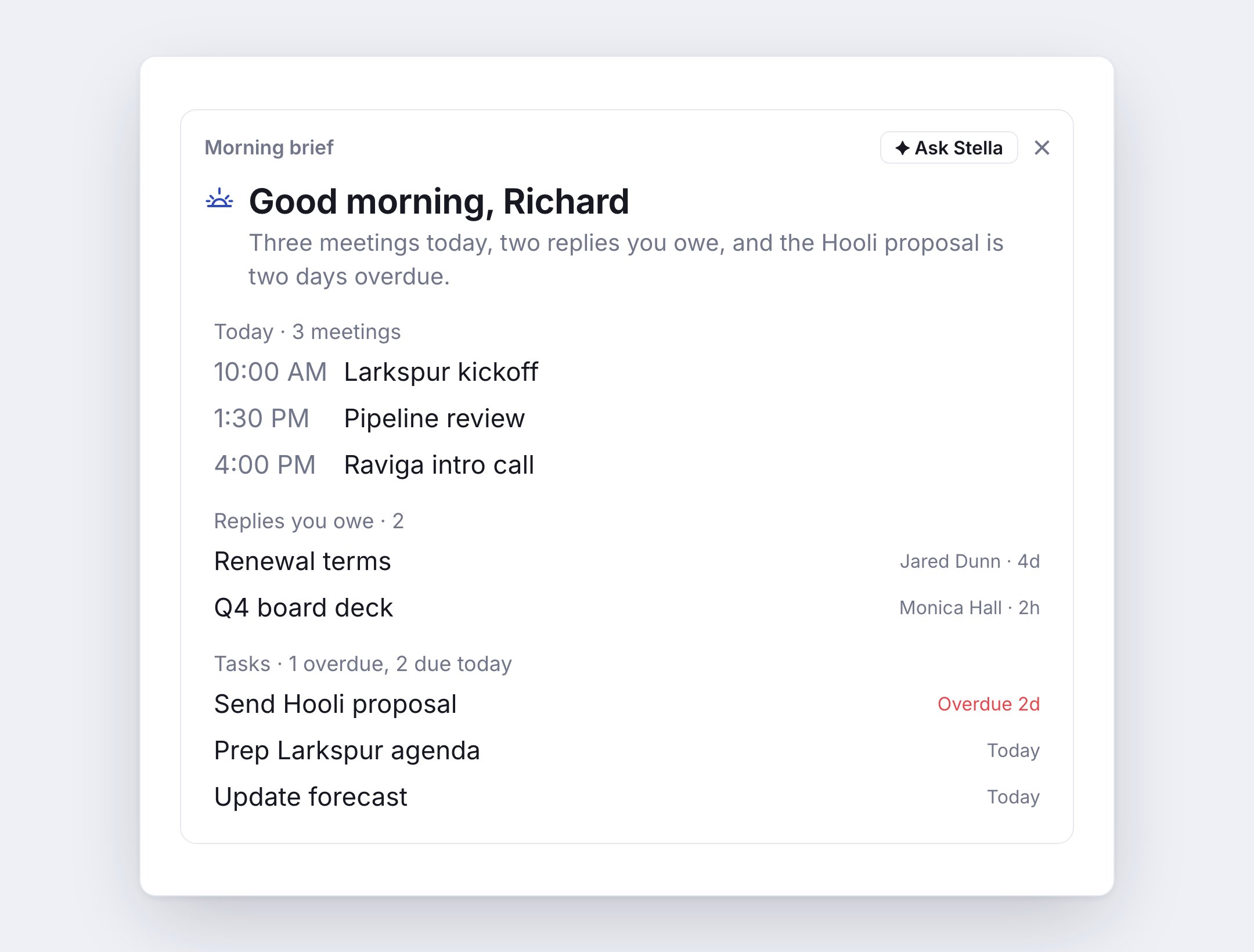
The **daily brief** is a short rundown of your day from Stella. Turn on a **morning brief**, an **end-of-day recap**, or both. Each one lands at the top of Home, and by push or email if you choose. Days with nothing on are skipped.
 ## Turn it on
* **Web**: **Settings → Daily Briefs**.
* **Mobile**: **Settings → Daily briefs**.
Switch on **Morning brief**, **End-of-day recap**, or both, and pick a time for each. Morning briefs go out between 5:00 and 11:00, recaps between 15:00 and 21:00, in half-hour steps.
| Setting | What it does |
| - | - |
| **Include** | Which sections the brief shows. All are on to start. |
| **Records you own** | Which objects to watch. A record is yours when a person field on it, like Owner, is you. Leave it empty to include every object that has one. |
| **Focus** | A note Stella leads the summary with when it applies, like "I'm closing the Acme deal this week". It can't add or remove lines. |
| **Send to** | **In-app**, **Push**, **Email**, or any mix. |
| **Weekdays only** | Skips Saturdays and Sundays. |
Times are in your time zone. If your device is in a different one, the card offers to switch. **Send one now** sends a brief right away: the morning brief before 2 PM, the recap after.
## What's in the morning brief
* **Today**: your meetings, each with a prep note, like who you last emailed and whether you owe them a reply.
* **Replies you owe**: emails waiting on your answer.
* **Waiting on you**: conversations waiting on your reply.
* **Waiting on them**: emails you sent that haven't had an answer.
* **Missed calls**.
* **Tasks**: what's overdue and what's due today.
* **Records you own**: records that are due this week, changed, have new activity, or have gone quiet.
* **Recommendations**: what Stella suggests doing next. See [Recommendations](/ai/recommendations).
## What's in the end-of-day recap
* What got done: replies sent, tasks finished, meetings held.
* **Still open**: what's left from today.
* **First thing tomorrow**: tomorrow's first meetings and tasks.
## One-tap actions
Every line has a button, so you can act without leaving the brief.
| Line | Actions |
| - | - |
| Meeting | **Prep me**, **Join** |
| Reply you owe | **Draft reply**, **Remind me** (brings it back tomorrow at 9 AM), **Done** |
| Waiting on them | **Draft follow-up**, **Drop it** |
| Waiting on you | **Reply** |
| Missed call | **Call back** |
| Task | **Done**, **Tomorrow** |
| Record gone quiet | **Update stage**, **Snooze 2 wks** |
| Recommendation | Its action, **Dismiss** |
**Prep me**, **Draft reply** and **Draft follow-up** open Stella. A draft opens in the reply box for you to review and send.
## Ask Stella about it
Press **Ask Stella** on the brief to start a chat with the brief attached. Try "What should I do first today?" or "Prep me for my 2 PM".
## See also
This documentation is built and hosted on [Mintlify](https://mintlify.com), a developer documentation platform.
## Turn it on
* **Web**: **Settings → Daily Briefs**.
* **Mobile**: **Settings → Daily briefs**.
Switch on **Morning brief**, **End-of-day recap**, or both, and pick a time for each. Morning briefs go out between 5:00 and 11:00, recaps between 15:00 and 21:00, in half-hour steps.
| Setting | What it does |
| - | - |
| **Include** | Which sections the brief shows. All are on to start. |
| **Records you own** | Which objects to watch. A record is yours when a person field on it, like Owner, is you. Leave it empty to include every object that has one. |
| **Focus** | A note Stella leads the summary with when it applies, like "I'm closing the Acme deal this week". It can't add or remove lines. |
| **Send to** | **In-app**, **Push**, **Email**, or any mix. |
| **Weekdays only** | Skips Saturdays and Sundays. |
Times are in your time zone. If your device is in a different one, the card offers to switch. **Send one now** sends a brief right away: the morning brief before 2 PM, the recap after.
## What's in the morning brief
* **Today**: your meetings, each with a prep note, like who you last emailed and whether you owe them a reply.
* **Replies you owe**: emails waiting on your answer.
* **Waiting on you**: conversations waiting on your reply.
* **Waiting on them**: emails you sent that haven't had an answer.
* **Missed calls**.
* **Tasks**: what's overdue and what's due today.
* **Records you own**: records that are due this week, changed, have new activity, or have gone quiet.
* **Recommendations**: what Stella suggests doing next. See [Recommendations](/ai/recommendations).
## What's in the end-of-day recap
* What got done: replies sent, tasks finished, meetings held.
* **Still open**: what's left from today.
* **First thing tomorrow**: tomorrow's first meetings and tasks.
## One-tap actions
Every line has a button, so you can act without leaving the brief.
| Line | Actions |
| - | - |
| Meeting | **Prep me**, **Join** |
| Reply you owe | **Draft reply**, **Remind me** (brings it back tomorrow at 9 AM), **Done** |
| Waiting on them | **Draft follow-up**, **Drop it** |
| Waiting on you | **Reply** |
| Missed call | **Call back** |
| Task | **Done**, **Tomorrow** |
| Record gone quiet | **Update stage**, **Snooze 2 wks** |
| Recommendation | Its action, **Dismiss** |
**Prep me**, **Draft reply** and **Draft follow-up** open Stella. A draft opens in the reply box for you to review and send.
## Ask Stella about it
Press **Ask Stella** on the brief to start a chat with the brief attached. Try "What should I do first today?" or "Prep me for my 2 PM".
## See also
This documentation is built and hosted on [Mintlify](https://mintlify.com), a developer documentation platform.