> ## Documentation Index
> Fetch the complete documentation index at: https://docs.custral.com/llms.txt
> Use this file to discover all available pages before exploring further.
# Data Models
> Understand how Custral structures information using Organizations, Objects, Records, and Properties.
# Data Models
Custral’s data model mirrors how teams already organize and connect information.
It’s flexible enough to model any workflow (from sales pipelines and onboarding journeys to product feedback and support tickets) while staying structured and consistent.
At its core, the model is built around **Organizations**, **Objects**, **Records**, and **Properties**.
***
## Overview
Each layer of Custral’s data model serves a distinct purpose:
| Layer | Description | Example |
| ---------------- | ------------------------------------------------------------------- | ----------------------------------------- |
| **Organization** | The top-level container for your company’s workspace. | `Custral` |
| **Object** | Defines a type of data within your organization. | `Contacts`, `Deals`, `Tickets` |
| **Record** | A single entry or instance of an Object. | `Avery Durrant`, `Deal #123` |
| **Property** | Defines a field or attribute available to all Records in an Object. | `Email`, `Renewal Date`, `Status` |
| **Field** | The actual value stored in a Record for a given Property. | `ada@example.com`, `Active`, `2026-06-01` |
Together, these layers connect every piece of customer data in one place.
***
## Hierarchy
Data in Custral flows downward: starting from your **Organization**, through **Objects**, down to **Records** and **Fields**.
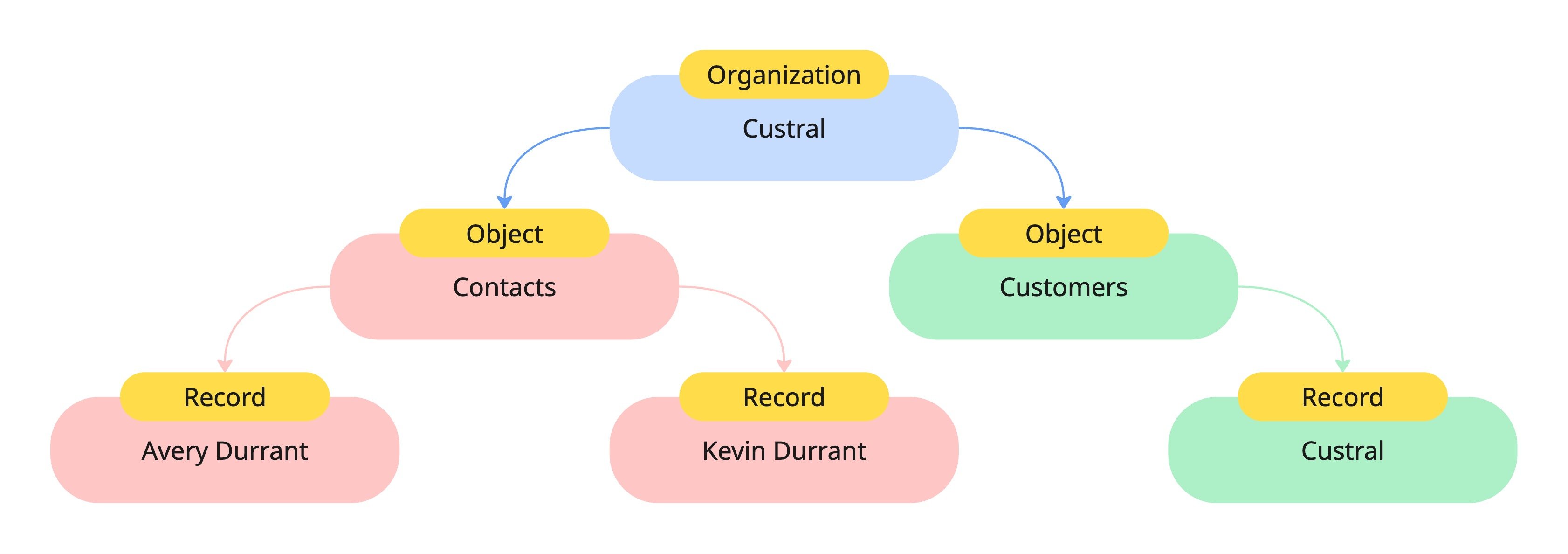 * **Organization**: The root container that owns all data, settings, and permissions.
* **Objects**: Define categories of information within your workspace.
* **Records**: Represent individual entries of an Object, like a specific customer or deal.
* **Fields**: Hold the actual values for each Property in a Record.
Each layer inherits access and structure rules from its parent, keeping data organized and secure.
***
## Example: Object and Record structure
Every Object defines a consistent structure for its Records.
For example, a `Contacts` Object might define Properties like **Contact Name** and **Email**.
Each Record under that Object will contain **Fields** that match those Properties.
* **Organization**: The root container that owns all data, settings, and permissions.
* **Objects**: Define categories of information within your workspace.
* **Records**: Represent individual entries of an Object, like a specific customer or deal.
* **Fields**: Hold the actual values for each Property in a Record.
Each layer inherits access and structure rules from its parent, keeping data organized and secure.
***
## Example: Object and Record structure
Every Object defines a consistent structure for its Records.
For example, a `Contacts` Object might define Properties like **Contact Name** and **Email**.
Each Record under that Object will contain **Fields** that match those Properties.
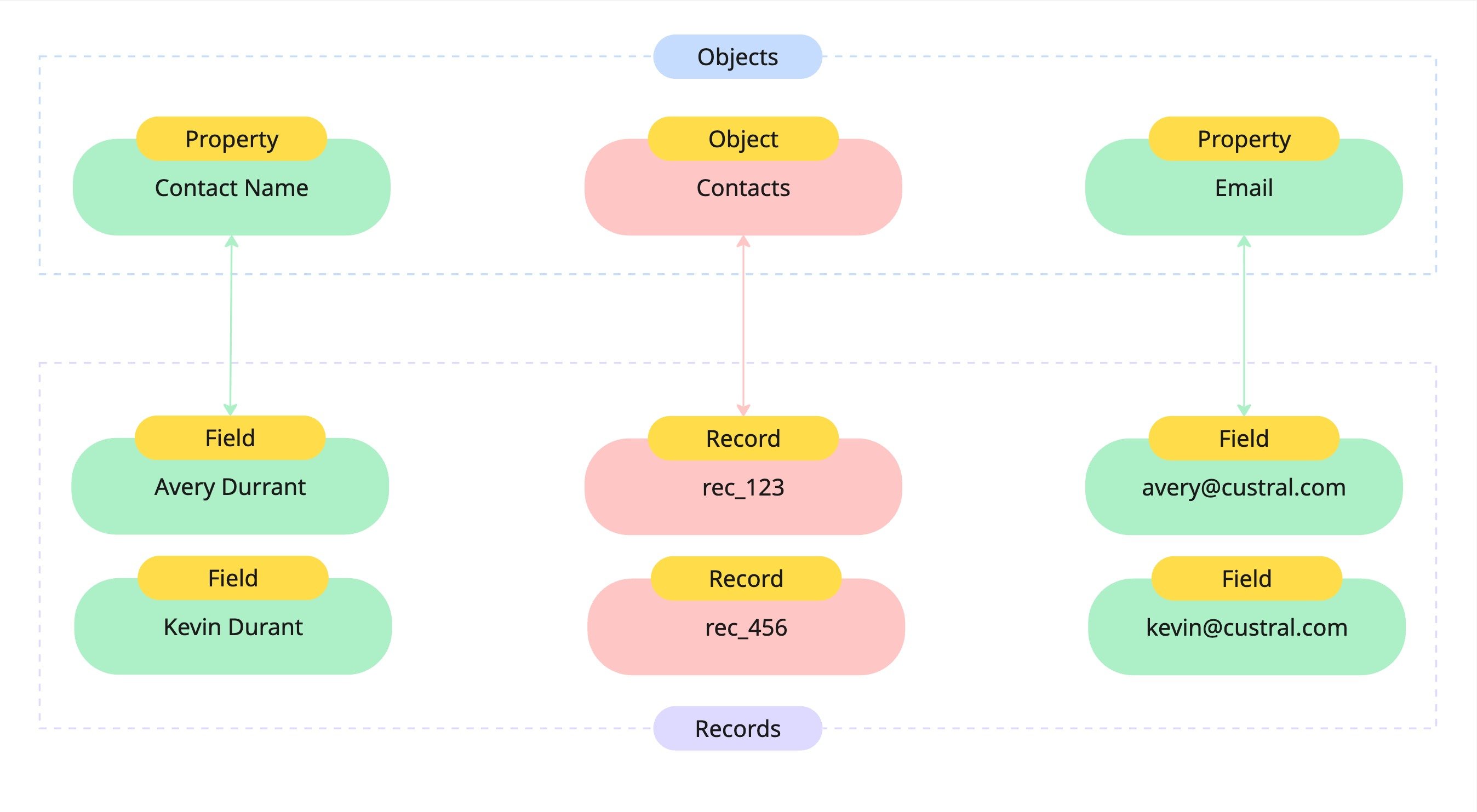 In this example:
* The **Contacts Object** defines two Properties: `Contact Name` and `Email`.
* Each **Record** (like `rec_123`) has corresponding Fields that store the values:
* `Avery Durrant`
* `ada@example.com`
This structure ensures every Record follows the same schema, making data reliable and easy to query, filter, or automate.
***
## Why this matters
Custral’s schema-driven model gives you:
* **Flexibility** – Create custom Objects and Properties for any workflow.
* **Consistency** – Every Record within an Object shares the same structure.
* **Scalability** – Add new data types or relationships without breaking existing data.
* **Context** – Link Objects and Records together for a 360° view of your customers.
***
## Best practices
**1. Define your core Objects first**
Start with your foundational data types (like Companies, Contacts, and Deals) before adding new ones.
**2. Keep Properties reusable**
When possible, use consistent property names across Objects for easier filtering and reporting.
**3. Use relationships to add context**
Connect Records between Objects (like linking a Contact to a Company) to enrich your data.
**4. Review structure as you scale**
As your workflows grow, revisit your Objects and Properties to keep your model clean and relevant.
***
## Summary
Custral’s data model provides a unified framework that connects everything your business tracks, from people and companies to interactions and outcomes.
Objects, Records, and Properties are the three pieces you combine to model any part of the customer lifecycle.
## Related topics
- [Data Structures](/data/overview.md)
- [Data Migration](/start/onboarding/migration.md)
- [Getting Started](/data/getting-started.md)
- [Surfaces](/surfaces/overview.md)
- [Introduction](/start/introduction.md)
In this example:
* The **Contacts Object** defines two Properties: `Contact Name` and `Email`.
* Each **Record** (like `rec_123`) has corresponding Fields that store the values:
* `Avery Durrant`
* `ada@example.com`
This structure ensures every Record follows the same schema, making data reliable and easy to query, filter, or automate.
***
## Why this matters
Custral’s schema-driven model gives you:
* **Flexibility** – Create custom Objects and Properties for any workflow.
* **Consistency** – Every Record within an Object shares the same structure.
* **Scalability** – Add new data types or relationships without breaking existing data.
* **Context** – Link Objects and Records together for a 360° view of your customers.
***
## Best practices
**1. Define your core Objects first**
Start with your foundational data types (like Companies, Contacts, and Deals) before adding new ones.
**2. Keep Properties reusable**
When possible, use consistent property names across Objects for easier filtering and reporting.
**3. Use relationships to add context**
Connect Records between Objects (like linking a Contact to a Company) to enrich your data.
**4. Review structure as you scale**
As your workflows grow, revisit your Objects and Properties to keep your model clean and relevant.
***
## Summary
Custral’s data model provides a unified framework that connects everything your business tracks, from people and companies to interactions and outcomes.
Objects, Records, and Properties are the three pieces you combine to model any part of the customer lifecycle.
## Related topics
- [Data Structures](/data/overview.md)
- [Data Migration](/start/onboarding/migration.md)
- [Getting Started](/data/getting-started.md)
- [Surfaces](/surfaces/overview.md)
- [Introduction](/start/introduction.md)