> ## Documentation Index
> Fetch the complete documentation index at: https://docs.custral.com/llms.txt
> Use this file to discover all available pages before exploring further.
# Navigation Overview
> Understand how Navigation, Sections, Folders, and Pages organize your workspace in Custral.
The left sidebar is how you move through Custral. It has two halves: the **built-in surfaces** everyone gets (your inbox, calls, calendar, tasks, conversations, and the AI assistant) and a **workspace tree you build yourself** out of Sections, Folders, and Pages. Data models decide *what* you store; navigation decides *where* you reach it.
## The sidebar at a glance
| Part | What it is |
| ---------------- | --------------------------------------------------------------------------------------------------------------------------------------------------- |
| **Org switcher** | Jump between the workspaces you belong to (top of the sidebar). |
| **Mode rail** | Home · Assistant · Conversations · Tasks · Search, switches what the sidebar shows. |
| **Modules** | Pinned shortcuts to built-in surfaces (Inbox, Texts, Calls, Calendar, Tasks, Convos, Workflows, Sequences). |
| **Favorites** | Pages and records you've starred, for one-click access. |
| **Page tree** | Your [Sections](/surfaces/navigation/sections) and the [Pages](/surfaces/navigation/pages) and [Folders](/surfaces/navigation/folders) inside them. |
| **Private** | Pages only you can see. |
| **Account menu** | Profile, workspace settings, and sign out (bottom of the sidebar). |
## The workspace hierarchy
The tree you build follows one simple hierarchy: **Sections** hold **Pages** and **Folders**, and each Page opens one or more **Views**.
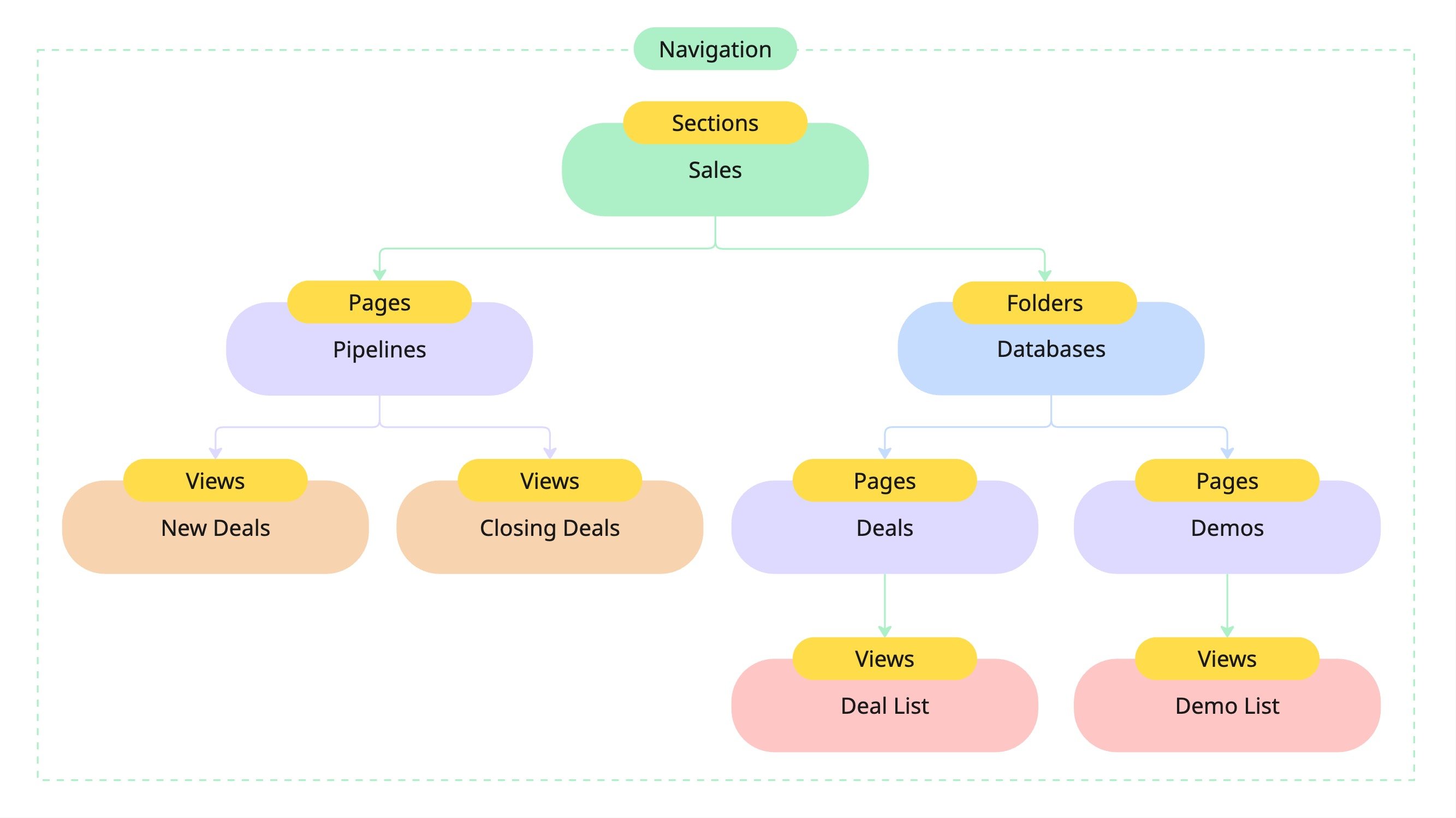 | Layer | What it is | Example |
| -------------------------------------------- | -------------------------------------------------------------- | ----------------------------- |
| **[Section](/surfaces/navigation/sections)** | A top-level, collapsible group, usually a team or area. | *Sales*, *Success*, *Support* |
| **[Folder](/surfaces/navigation/folders)** | A page that holds other pages, so you can group related work. | *Databases*, *Pipelines* |
| **[Page](/surfaces/navigation/pages)** | Opens a surface: a dashboard, a database/table, or a document. | *Deals*, *Demos* |
| **View** | A tab inside a page, a filtered lens on your data. | *New Deals*, *Closing Deals* |
A **folder is just a page that holds other pages**. There's no separate "folder" object, only a page shown with a folder icon. Folders nest a couple of levels deep (a folder can hold a subfolder), which keeps large workspaces tidy without turning the sidebar into an endless tree.
## Modes
The mode rail at the top of the sidebar swaps what the sidebar body shows, without leaving the page you're on:
Your Modules, Favorites, page tree, and Private pages: the default.
Chat with the [AI assistant](/ai/chat-agents/overview) and revisit past threads.
A live list of open conversations across email, SMS, voice, and chat.
Your task queue, grouped and filterable.
**Search** sits at the far right of the rail and finds pages, records, and conversations across the workspace.
## Modules, Favorites, and Private pages
* **Modules** are pinnable shortcuts to Custral's built-in surfaces. Hit **Edit** on the Modules rail to pin or unpin Inbox, Texts, Calls, Calendar, Tasks, Convos, Workflows, or Sequences. Everyone tailors their own rail.
* **Favorites** collect the pages and records you star, so they're one click away no matter where they live in the tree.
* **Private pages** are scoped to you alone (scratch notes, a work-in-progress dashboard) and live in their own part of the sidebar, below the shared tree.
## Build your navigation
A new workspace starts empty. Add your first Section from the page tree and give it a name and icon (for example, *Sales*).
Inside the section, add Pages: a dashboard, a database of records, or a document.
Create a folder, or drag pages onto one another, to group related work. A folder can hold a subfolder, a level or two deep.
Drag pages to reorder them or nest them into a folder. A page's **⋯** menu also lets you rename, duplicate, move it to another section, copy its link, or add it to Favorites.
Your Sections, Pages, and their order are **shared across the workspace** and respect [permissions](/team/permissions/overview): a Section (and everything in it) can be limited to a group, and each Page inherits access from its Section. For a layout only you can see, use a **Private** page instead.
## Related
* [Sections](/surfaces/navigation/sections) · [Folders](/surfaces/navigation/folders) · [Pages](/surfaces/navigation/pages)
* [Views overview](/surfaces/views/overview): the tabs a page hosts.
* [Record routing](/surfaces/records/overview): how a record renders its object's views.
* [Entities](/surfaces/entities) · [Permissions](/team/permissions/overview)
## Related topics
- [Folders](/surfaces/navigation/folders.md)
- [Sections](/surfaces/navigation/sections.md)
- [Permissions Overview](/team/permissions/overview.md)
- [Pages](/surfaces/navigation/pages.md)
- [Library](/surfaces/navigation/library.md)
| Layer | What it is | Example |
| -------------------------------------------- | -------------------------------------------------------------- | ----------------------------- |
| **[Section](/surfaces/navigation/sections)** | A top-level, collapsible group, usually a team or area. | *Sales*, *Success*, *Support* |
| **[Folder](/surfaces/navigation/folders)** | A page that holds other pages, so you can group related work. | *Databases*, *Pipelines* |
| **[Page](/surfaces/navigation/pages)** | Opens a surface: a dashboard, a database/table, or a document. | *Deals*, *Demos* |
| **View** | A tab inside a page, a filtered lens on your data. | *New Deals*, *Closing Deals* |
A **folder is just a page that holds other pages**. There's no separate "folder" object, only a page shown with a folder icon. Folders nest a couple of levels deep (a folder can hold a subfolder), which keeps large workspaces tidy without turning the sidebar into an endless tree.
## Modes
The mode rail at the top of the sidebar swaps what the sidebar body shows, without leaving the page you're on:
Your Modules, Favorites, page tree, and Private pages: the default.
Chat with the [AI assistant](/ai/chat-agents/overview) and revisit past threads.
A live list of open conversations across email, SMS, voice, and chat.
Your task queue, grouped and filterable.
**Search** sits at the far right of the rail and finds pages, records, and conversations across the workspace.
## Modules, Favorites, and Private pages
* **Modules** are pinnable shortcuts to Custral's built-in surfaces. Hit **Edit** on the Modules rail to pin or unpin Inbox, Texts, Calls, Calendar, Tasks, Convos, Workflows, or Sequences. Everyone tailors their own rail.
* **Favorites** collect the pages and records you star, so they're one click away no matter where they live in the tree.
* **Private pages** are scoped to you alone (scratch notes, a work-in-progress dashboard) and live in their own part of the sidebar, below the shared tree.
## Build your navigation
A new workspace starts empty. Add your first Section from the page tree and give it a name and icon (for example, *Sales*).
Inside the section, add Pages: a dashboard, a database of records, or a document.
Create a folder, or drag pages onto one another, to group related work. A folder can hold a subfolder, a level or two deep.
Drag pages to reorder them or nest them into a folder. A page's **⋯** menu also lets you rename, duplicate, move it to another section, copy its link, or add it to Favorites.
Your Sections, Pages, and their order are **shared across the workspace** and respect [permissions](/team/permissions/overview): a Section (and everything in it) can be limited to a group, and each Page inherits access from its Section. For a layout only you can see, use a **Private** page instead.
## Related
* [Sections](/surfaces/navigation/sections) · [Folders](/surfaces/navigation/folders) · [Pages](/surfaces/navigation/pages)
* [Views overview](/surfaces/views/overview): the tabs a page hosts.
* [Record routing](/surfaces/records/overview): how a record renders its object's views.
* [Entities](/surfaces/entities) · [Permissions](/team/permissions/overview)
## Related topics
- [Folders](/surfaces/navigation/folders.md)
- [Sections](/surfaces/navigation/sections.md)
- [Permissions Overview](/team/permissions/overview.md)
- [Pages](/surfaces/navigation/pages.md)
- [Library](/surfaces/navigation/library.md)