> ## Documentation Index
> Fetch the complete documentation index at: https://docs.custral.com/llms.txt
> Use this file to discover all available pages before exploring further.
# Permissions Overview
> Understand how teams organize users, permissions, and collaboration across Custral.
Custral's permission system is built on **Entities**, **Access Control Lists (ACLs)**, and **Groups**.
Access is granted on an entity and inherited down the tree, so thousands of Records, Views or Pages are governed by a handful of grants you can read in one place.
***
## Entities and ACLs
Every item inside Custral (an Object, Record, Section, Page, View, and more) is represented as an **Entity**.
Entities define ownership, visibility, and access rules.
Each Entity has its own **Access Control List (ACL)**, which stores who has access and what level of control they have.
An ACL entry pairs a **subject** (an individual user *or* a Group) with an **access level**, so you can manage permissions for one person or a whole team through the same mechanism.
***
## The hierarchy
Entities are structured in a hierarchy that mirrors your workspace. Every entity sits beneath the **Workspace** (your organization), which is the root of the tree:
| Example path | Description |
| ------------------------------- | ----------------------------------------------------------------- |
| **Workspace → Object → Record** | Data model. An Object holds its Records |
| **Workspace → Section → Page** | Navigation. A Section holds its Pages (which can nest in folders) |
| **Page / Object → View** | A View or dashboard inherits from the Page or Object it lives on |
Each level can **inherit** access from its parent or define its own independent ACL.
Inheritance makes management simple, while manual control allows for exceptions.
***
## Inheritance control
Permissions in Custral **flow downward by default**, following the entity hierarchy.
When inheritance is **enabled**, a subject's access on a parent flows to its child Entities at the same level.
Example:
* Giving a user **Edit** access to the **Contacts Object** lets them edit all individual contact Records.
* Granting **Read** access to a **Sales Section** lets them view all Pages inside it.
A direct grant on a child Entity can **raise** a subject's access above what it inherits. To *restrict* access below the inherited level, **disable inheritance** on that Entity. It then defines its own ACL and no longer receives permission updates from its parent.
Common use cases:
* A confidential Record that only specific people can view
* A public-facing View that remains readable even when the underlying Object is private
* A Page shared with another department without exposing the entire Section
***
## Users and Groups
Permissions in Custral can be assigned to:
* **Individual users**: ideal for specific access needs or one-off exceptions.
Example: granting an implementation specialist temporary Edit rights to a client's data.
* **Groups**: reusable collections of users such as *Sales Team*, *Customer Success*, or *Support*.
Assigning access to a Group grants the same access to all its members. When someone joins or leaves a Group, their access updates instantly everywhere that Group is referenced.
When a user's access could come from more than one place (a direct grant and one or more Group grants) Custral applies the **highest** level that reaches them. Groups make it easy to manage access at scale: add a new hire to the **Sales Team** Group and they automatically gain everything tied to it; adjust the Group's access once and it applies everywhere.
See [User Groups](/team/users/groups) for how to create and manage them.
***
## Access levels
Each Entity supports a consistent set of access levels.
Higher levels always include all capabilities from the levels below.
| Level | What it allows |
| ----------- | ----------------------------------------------------------------------- |
| **None** | No visibility or access |
| **Read** | View data but make no changes |
| **Comment** | Add comments, notes, or mentions |
| **Edit** | Modify Records or fields |
| **Delete** | Remove Records or items the user can edit |
| **Admin** | Manage settings, automations, and the ACL for the Entity |
| **Owner** | Full control, including transferring ownership or adjusting inheritance |
These levels work the same for both users and Groups.
For example, giving the **Sales Team** Group *Edit* access to the *Deals Object* grants every team member editing permissions for all Deals.
When granting access, the editor offers **None**, **Read**, **Edit**, **Delete**, **Admin**, and **Owner** (choose *None* to remove a subject's grant). Higher levels always include the capabilities below them.
***
## Where to manage permissions
Open **Settings → Permissions** to manage access across your workspace:
* The **Workspace** panel at the top holds [global grants](/team/permissions/global) that cascade to everything.
* The **Sections & Pages** and **Objects** tabs list your entities; click the lock icon on any row to open its access editor.
In the access editor you can toggle **inheritance** on or off, add a user or Group as a subject, and set each subject's level. Records inherit from their Object, so you usually manage access at the Object level and let it flow down.
***
## Why hierarchy matters
Custral's permission model balances **consistency** and **flexibility**:
* **Consistency**: access applied once at a higher level flows automatically to all child Entities.
* **Flexibility**: inheritance can be disabled anywhere, giving you granular control where needed.
* **Simplicity**: Groups let you manage access for teams without updating each individual user.
* **Transparency**: every Entity clearly shows its source of access, inherited or direct.
***
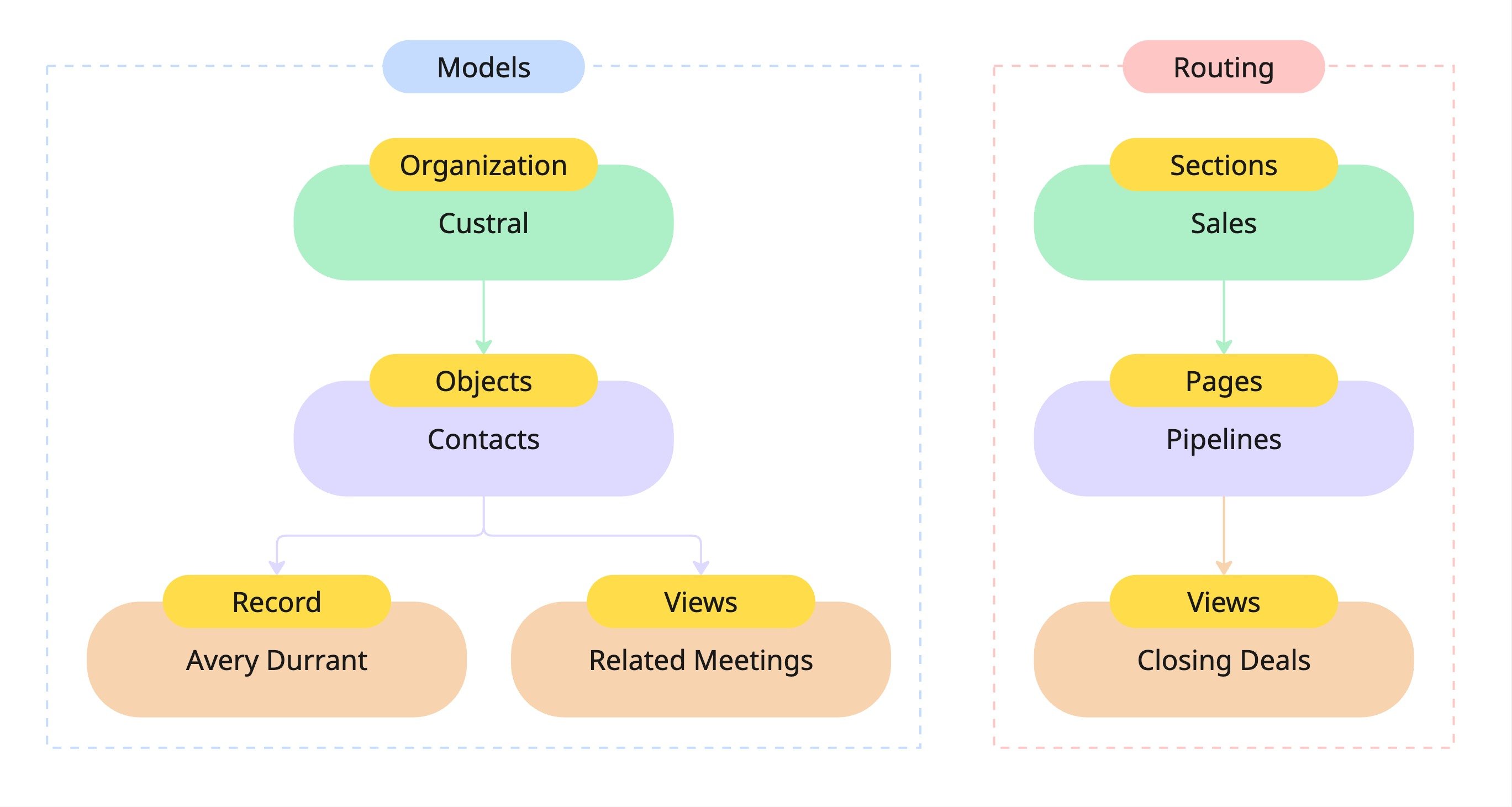
## Visual overview
Each Entity (like Workspace, Object, Record, or View) can choose to inherit or define its own ACL.
When inheritance is on, permissions flow downward.
When it's off, that Entity enforces its own rules.
 ***
## Best practices
**1. Use Groups for teams**
Assign permissions to Groups whenever possible. It scales better than managing individuals.
**2. Enable inheritance where possible**
Apply permissions at higher levels (like Objects or Sections) so changes cascade automatically.
**3. Turn off inheritance for exceptions**
Disable inheritance when an Entity needs unique access, such as a private Record or a shared dashboard.
**4. Limit high-level access**
Keep Admin and Owner grants restricted to prevent accidental permission changes.
**5. Audit regularly**
Review Group memberships and ACLs to keep your access model clean and predictable.
***
## Troubleshooting
**Someone can see more than expected.**
A broad grant higher in the hierarchy is probably cascading down. Review the parent Entity (or the Workspace panel), lower or remove the grant, or disable inheritance on the specific Entity to give it its own ACL.
**A user can't access something they should.**
Check that a grant reaches them either directly or through a Group, and that inheritance isn't turned off on the Entity or a parent. Remember overlapping grants resolve to the **highest** level, so add the missing grant at the level you want.
**I don't see "Comment" when granting access.**
The access editor offers None, Read, Edit, Delete, Admin, and Owner. Use Read for view-only access; Edit and above include the ability to contribute.
***
## Summary
* Everything in Custral is an **Entity** with its own **ACL**.
* Entities can **inherit** access or manage it independently.
* Permissions can be given to **users or Groups**, and overlapping access resolves to the highest level.
* Access levels define what actions each subject can take.
This model keeps your workspace secure, scalable, and easy to manage as your team grows.
***
## Related
* [Access levels](/team/permissions/access): what each level allows and how to choose one.
* [Global permissions](/team/permissions/global): workspace-wide grants that cascade to everything.
* [User Groups](/team/users/groups): grant access to many users at once.
* [Users](/team/users/overview): manage the people in your workspace.
## Related topics
- [Global Permissions](/team/permissions/global.md)
- [Entities](/surfaces/entities.md)
- [Teams](/team/users/groups.md)
- [Pages](/surfaces/navigation/pages.md)
- [Page recovery](/surfaces/navigation/page-recovery.md)
***
## Best practices
**1. Use Groups for teams**
Assign permissions to Groups whenever possible. It scales better than managing individuals.
**2. Enable inheritance where possible**
Apply permissions at higher levels (like Objects or Sections) so changes cascade automatically.
**3. Turn off inheritance for exceptions**
Disable inheritance when an Entity needs unique access, such as a private Record or a shared dashboard.
**4. Limit high-level access**
Keep Admin and Owner grants restricted to prevent accidental permission changes.
**5. Audit regularly**
Review Group memberships and ACLs to keep your access model clean and predictable.
***
## Troubleshooting
**Someone can see more than expected.**
A broad grant higher in the hierarchy is probably cascading down. Review the parent Entity (or the Workspace panel), lower or remove the grant, or disable inheritance on the specific Entity to give it its own ACL.
**A user can't access something they should.**
Check that a grant reaches them either directly or through a Group, and that inheritance isn't turned off on the Entity or a parent. Remember overlapping grants resolve to the **highest** level, so add the missing grant at the level you want.
**I don't see "Comment" when granting access.**
The access editor offers None, Read, Edit, Delete, Admin, and Owner. Use Read for view-only access; Edit and above include the ability to contribute.
***
## Summary
* Everything in Custral is an **Entity** with its own **ACL**.
* Entities can **inherit** access or manage it independently.
* Permissions can be given to **users or Groups**, and overlapping access resolves to the highest level.
* Access levels define what actions each subject can take.
This model keeps your workspace secure, scalable, and easy to manage as your team grows.
***
## Related
* [Access levels](/team/permissions/access): what each level allows and how to choose one.
* [Global permissions](/team/permissions/global): workspace-wide grants that cascade to everything.
* [User Groups](/team/users/groups): grant access to many users at once.
* [Users](/team/users/overview): manage the people in your workspace.
## Related topics
- [Global Permissions](/team/permissions/global.md)
- [Entities](/surfaces/entities.md)
- [Teams](/team/users/groups.md)
- [Pages](/surfaces/navigation/pages.md)
- [Page recovery](/surfaces/navigation/page-recovery.md)