

The five biggest changes
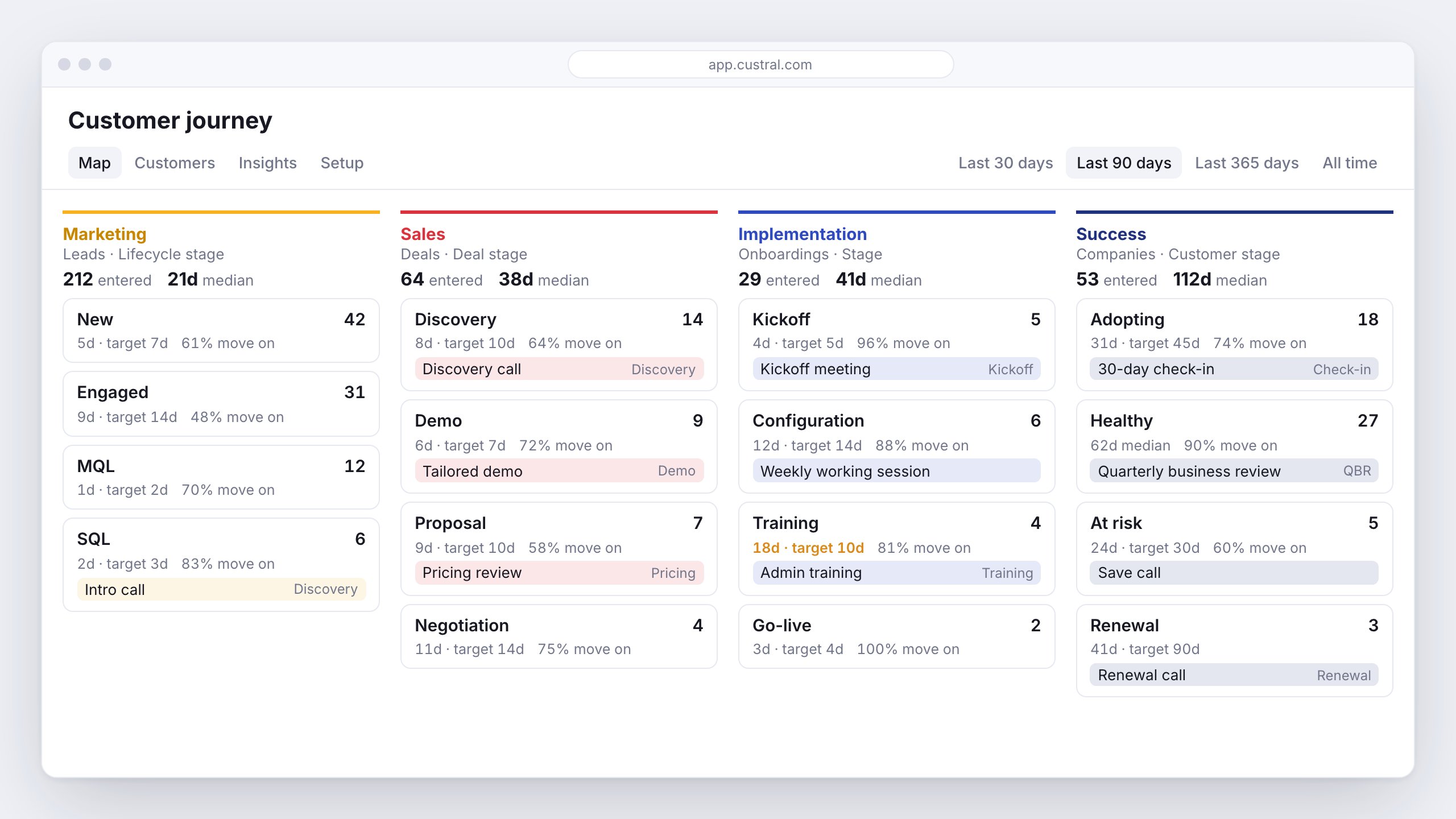
- Customer journeys. See every customer’s stage from first touch to renewal in one view, with a target time, meetings and focus tasks for each stage. See Customer journeys.
- Live coach. During a call, the playbook’s script stays in front of you and moves on as you cover each step, with objections and battle cards as they come up. See Live coach.
- Chrome extension. Ask Stella about any page, add people from LinkedIn, and call, email or save a note without leaving the tab. See Chrome extension.
- Website chat. Visitors get answers drawn only from your website, page prompts on the pages you choose, and a way to reach their account manager. See Website chat.
- Revenue. Send a quote your customer accepts, signs and pays on one page, with billing on your own Stripe account. See Revenue.
Also this month
- Stella routines: ask Stella for something on a schedule, like a Monday digest of quiet deals, by email or chat. See Routines.
- Home: Stella greets you with one line about your day and up to three things to start on. See Home.
- Call moments: a recorded call shows its talk ratio, topics and key moments, with next steps to approve in one go. See Call moments.
- Notification rules: write a rule like a sentence to decide what pings you and when. See Notifications.
- Templates store: add a whole area to your workspace from a template, as a draft you can undo for 7 days. See Templates.
Every October release
The full changelog, including fixes.