

Customer journeys map every customer from first touch to renewal
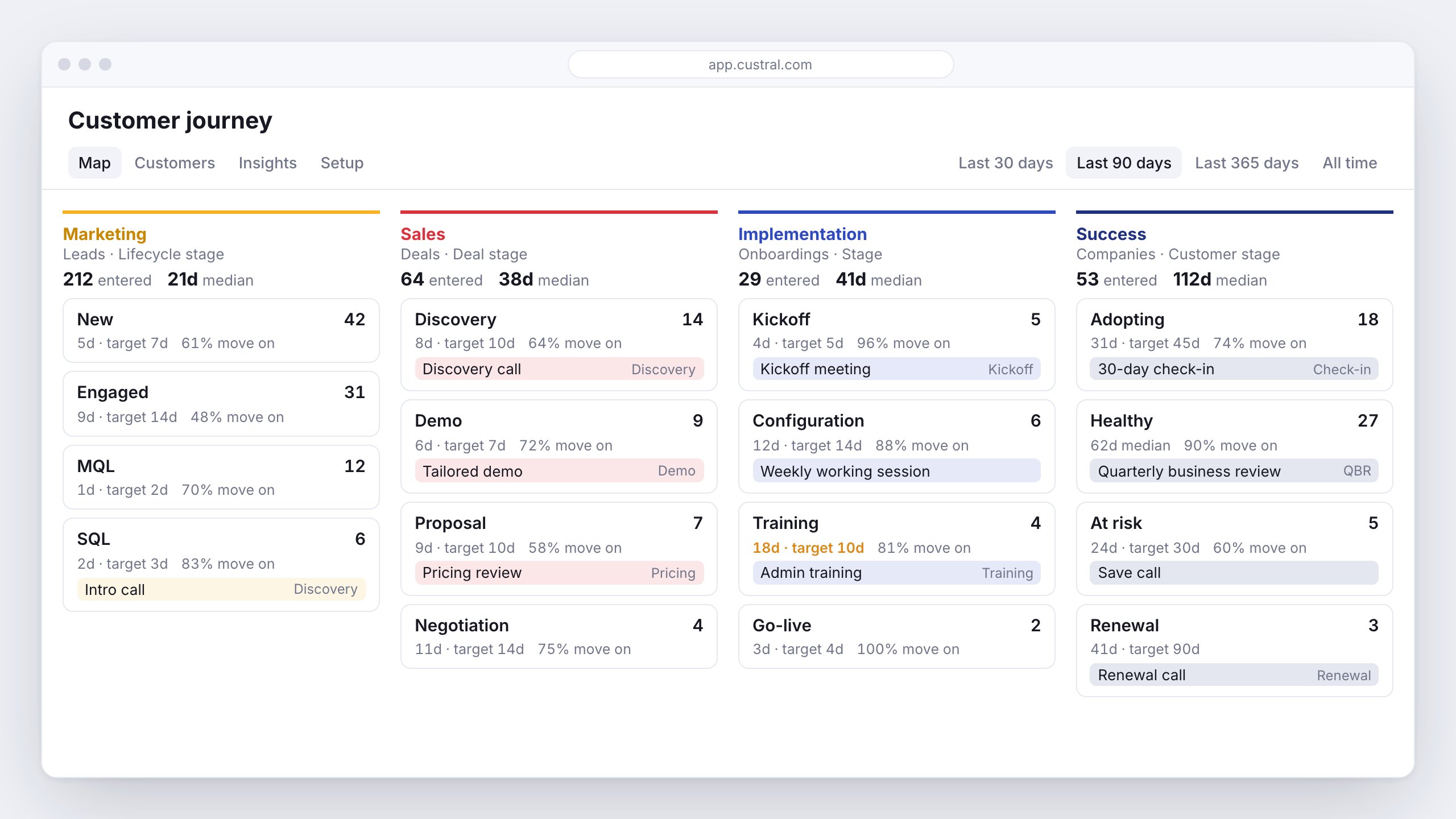
Customer journeys
See every customer’s stage in one view: Marketing, Sales, Implementation and Success sit in one row, built from the stages you already track on deals and companies. Build out each stage with a target time, the meetings you expect there with a playbook for each, and focus tasks, some of which tick themselves off once the meeting happens. The Map shows how long customers spend in each stage and how many move on, Customers shows who is past target, and Insights shows what leads to renewal and where customers drop off. Each customer gets a Journey tab with their whole path, goals and people, handoff briefs for the next owner, and a page you can share with them. See Customer journeys.Live coach
During a call, the playbook’s script stays pinned in front of you and moves to the next step as you cover it, or step through it by hand. Objections, battle cards and upsell moments appear as they come up, Stella answers in one line, and if the customer cares about something else it suggests a better playbook. On desktop the coach floats over the meeting and is hidden from screen share. See Live coach.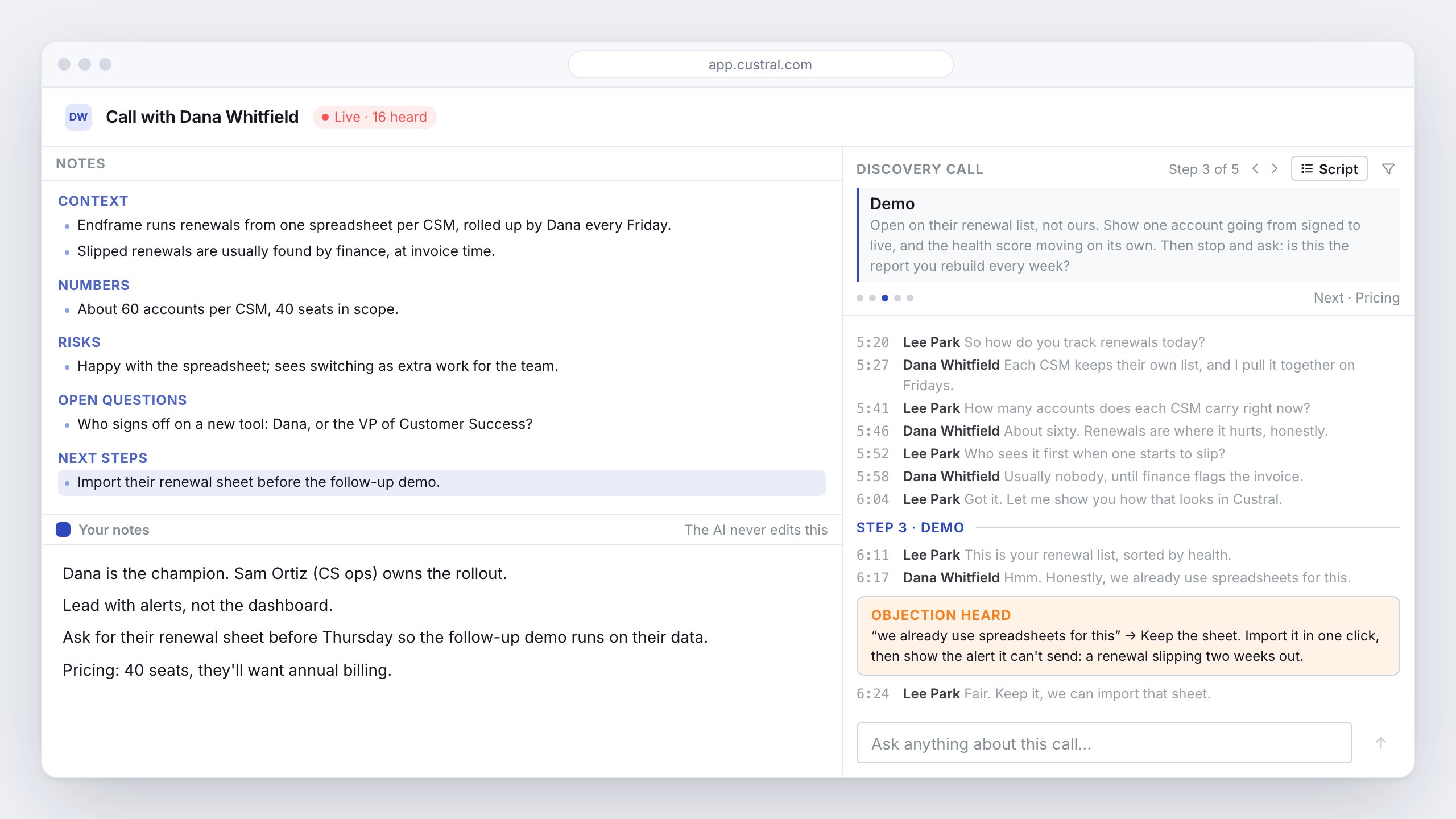
Stella routines
Ask Stella for something on a schedule, like a Monday digest of quiet deals or a daily sweep of unanswered chats, and get the answer by email or as a Stella chat. Start from four ready-made routines, or say “every Monday” in chat and Stella offers to set one up. Routines are yours, and they can read your workspace but never change it. See Routines.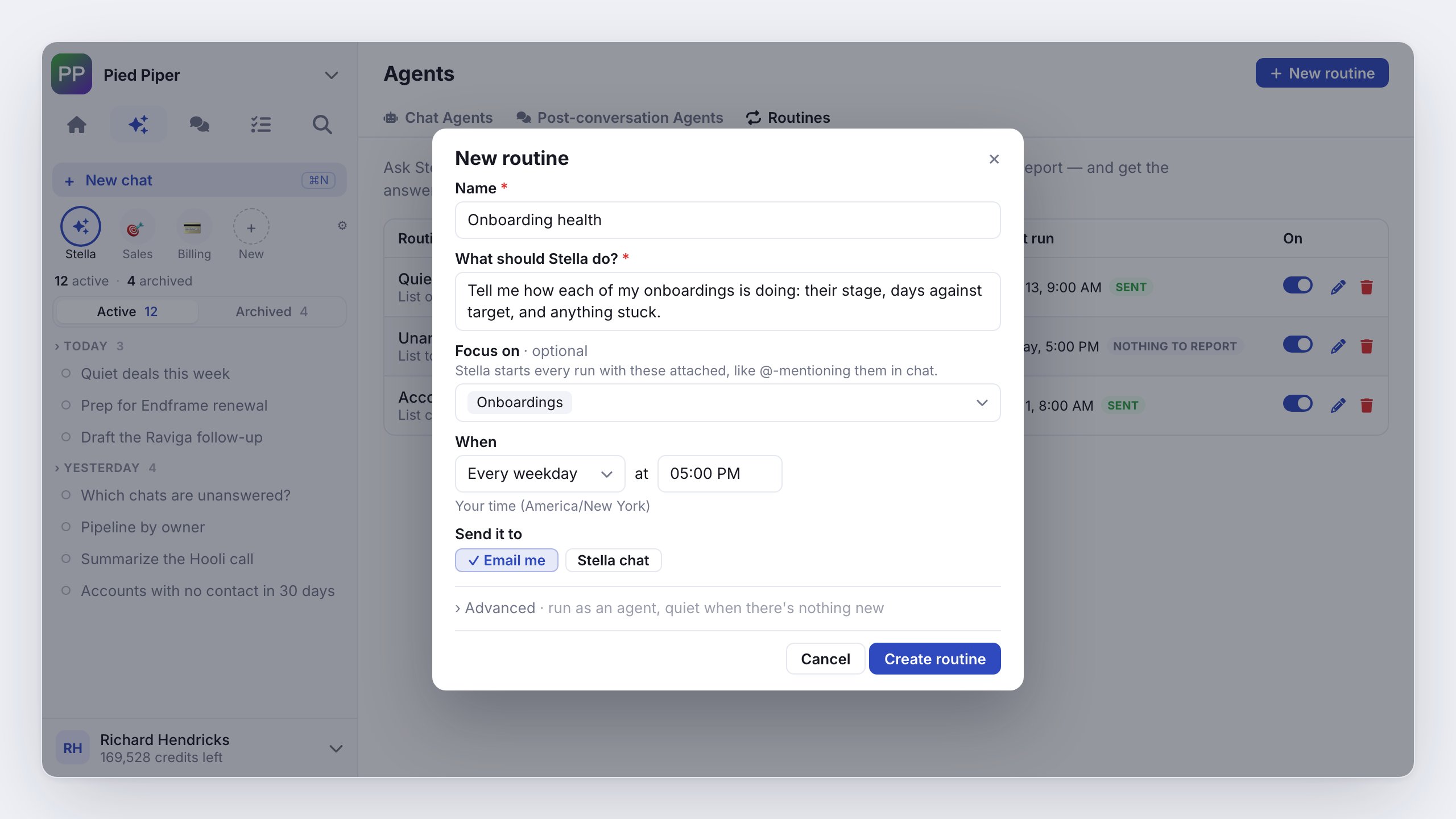
Also new
- Who’s here: see who else has the same page, record, doc or conversation open, and click a name to go where they are or follow them. In a conversation, a note shows when a teammate is already writing a reply. See Who’s here.
- Living notes: turn them on for an object and every record keeps an AI summary above its notes, updated after each call, email or change, with every line citing its source.
- Teammate profiles: each teammate has a profile with their title, team, local time and hours, what they own, and a Contact menu for Slack, Teams or email.
- Lists: filter any view by In list, and start a sequence or workflow when a record joins or leaves a list. Stella can build a list from other lists.
- Business-hours waits: a sequence wait can count only working hours, the workspace’s or a team’s, in the hours’ time zone or the recipient’s.
- By rules: review every email your rules handled, grouped by rule, and undo one or all.
- Playbooks: each playbook is scored on its own calls, and shows Ready to update with drafted changes when its score drops.
- Stella drafts first: before saving a sheet, document, canvas or deck, Stella shows you the draft to keep, edit or adjust. The composer has a mic.
Fixed
- HubSpot imports put emails in the Email field, with one column per field.
- Sign-in says why it was refused when too many attempts come from one network.
- Thumbs-down on a Stella answer opens the feedback box.
- Click-to-call in Chrome leaves dates and times alone.
Home starts with Stella, calls show their key moments, and rules decide what pings you
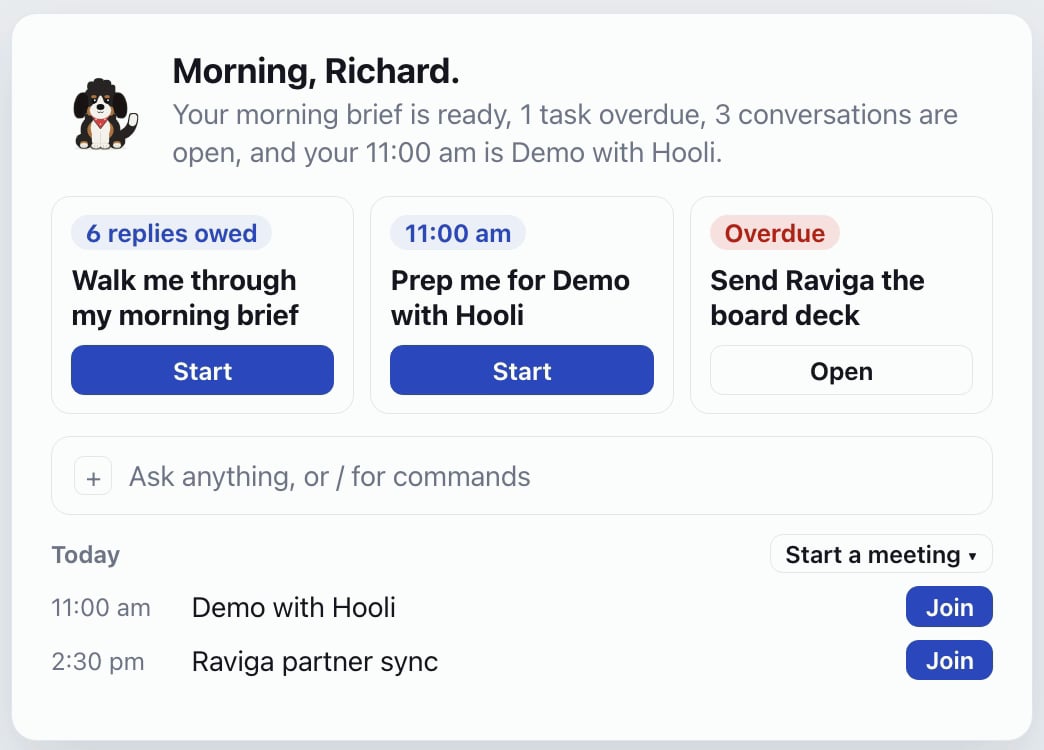
Stella-first Home
Stella greets you with one line about your day, then offers up to three things to start on, like prepping your next meeting or drafting replies to open conversations. Today’s meetings sit underneath with a Join button. On web and mobile. See Home.Call moments and Next steps
A recorded call’s Moments tab shows the talk ratio, the topics in order, and key moments like questions, objections, pricing and competitor mentions; click one to jump the recording there. Add your own trackers, by keyword or a question the AI listens for. Next steps groups the follow-ups into people and company, your tasks, and what the customer promised, with Approve all. See Call moments.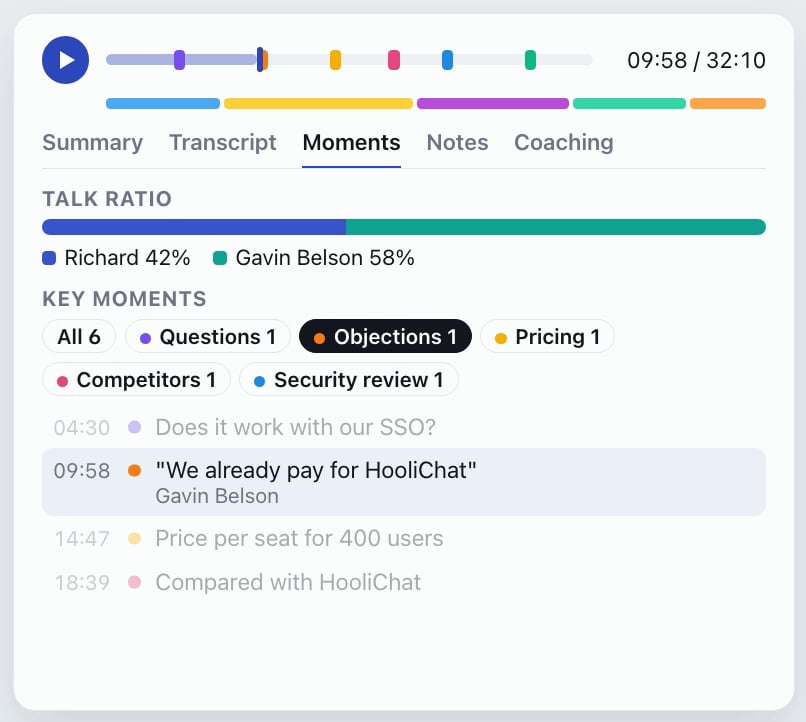
Notification rules
Write a rule like a sentence, such as “keep reminding me every minute until a website chat is answered”. Limit it to while you’re on call, escalate to whoever is on call or a team, and send yourself a test before you save. See Notifications.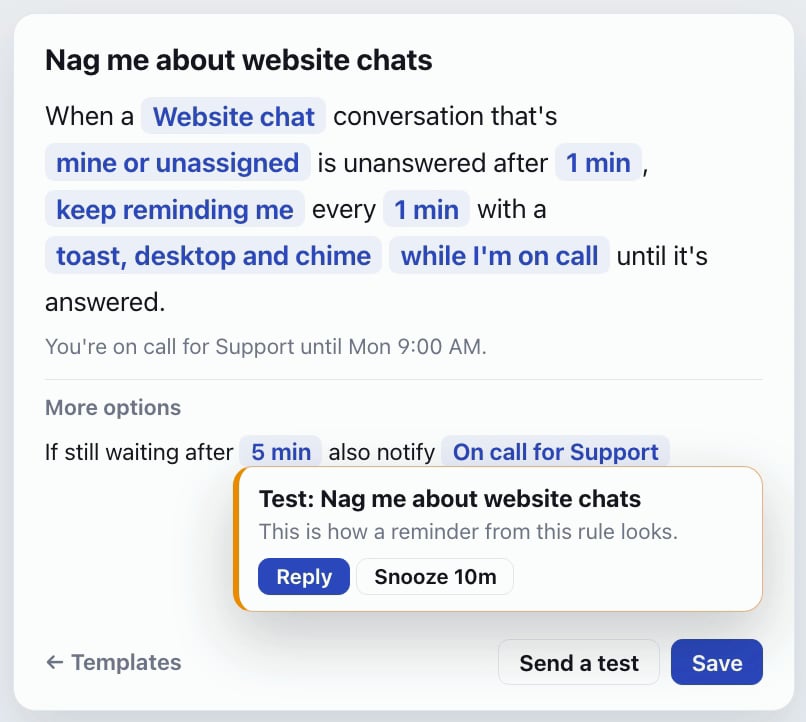
Templates store
Add a whole area to your workspace, like Billing or Product, from a template made by Custral or published by another workspace. Before you install, each part is marked as new or already yours, and the install opens as a draft you can undo for 7 days. See Templates.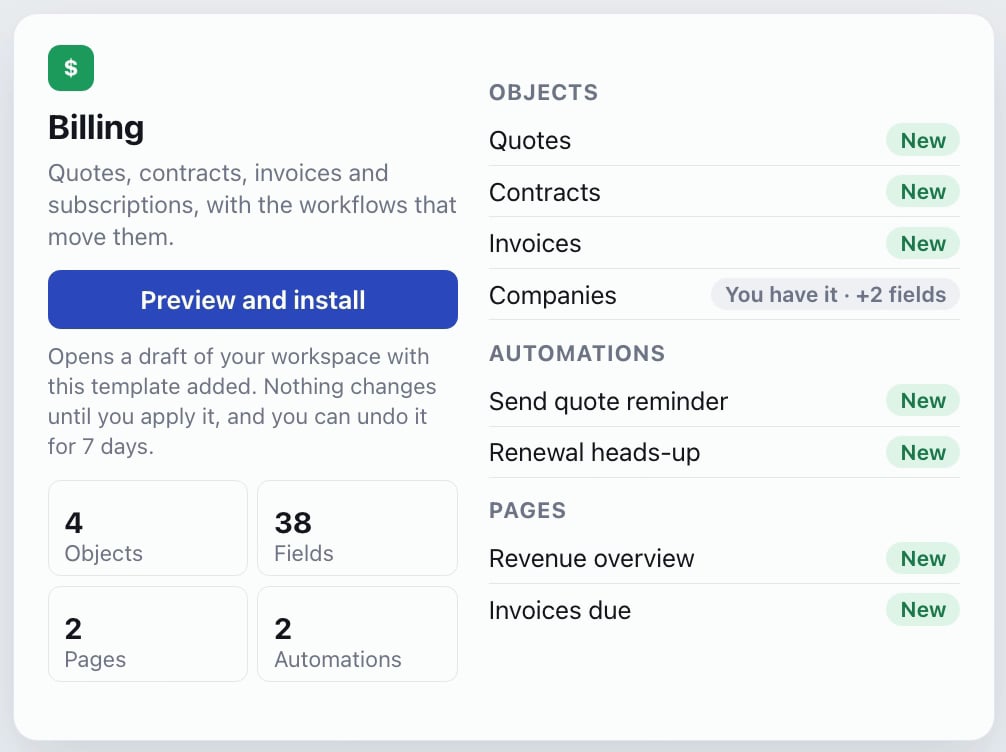
Also new
- AI limits: set a monthly AI cap for the workspace, a default per member, and rules per team or person, including AI off. Members see their own usage and can ask an admin for more.
- Audit Log: workspace admins see who did what in Settings → Audit Log, with filters and a CSV export.
- Settings: 70 pages are now 54, with related pages merged into tabs.
- Away until: set yourself away for an hour, until tomorrow, or until a time you pick, from a slimmer account menu.
- Website chat: a chat nobody has answered gets one follow-up line, the handoff says when an away team is back, and the bot’s answer appears as it is written.
- Desktop: choose what the Dock badge counts.
- Recommendations: expand in the sidebar, and each one opens on its own page.
- Email snippets: any snippet with a subject is an email snippet, which a workflow, sequence or email task can send.
Fixed
- Each call keeps one recording, and a blank call keeps none.
- Two emails with the same subject stay separate.
- A new page or section lands after the last one.
Custral in Chrome, a smarter website chat, quotes that get you paid, and coaching goals
Chrome extension
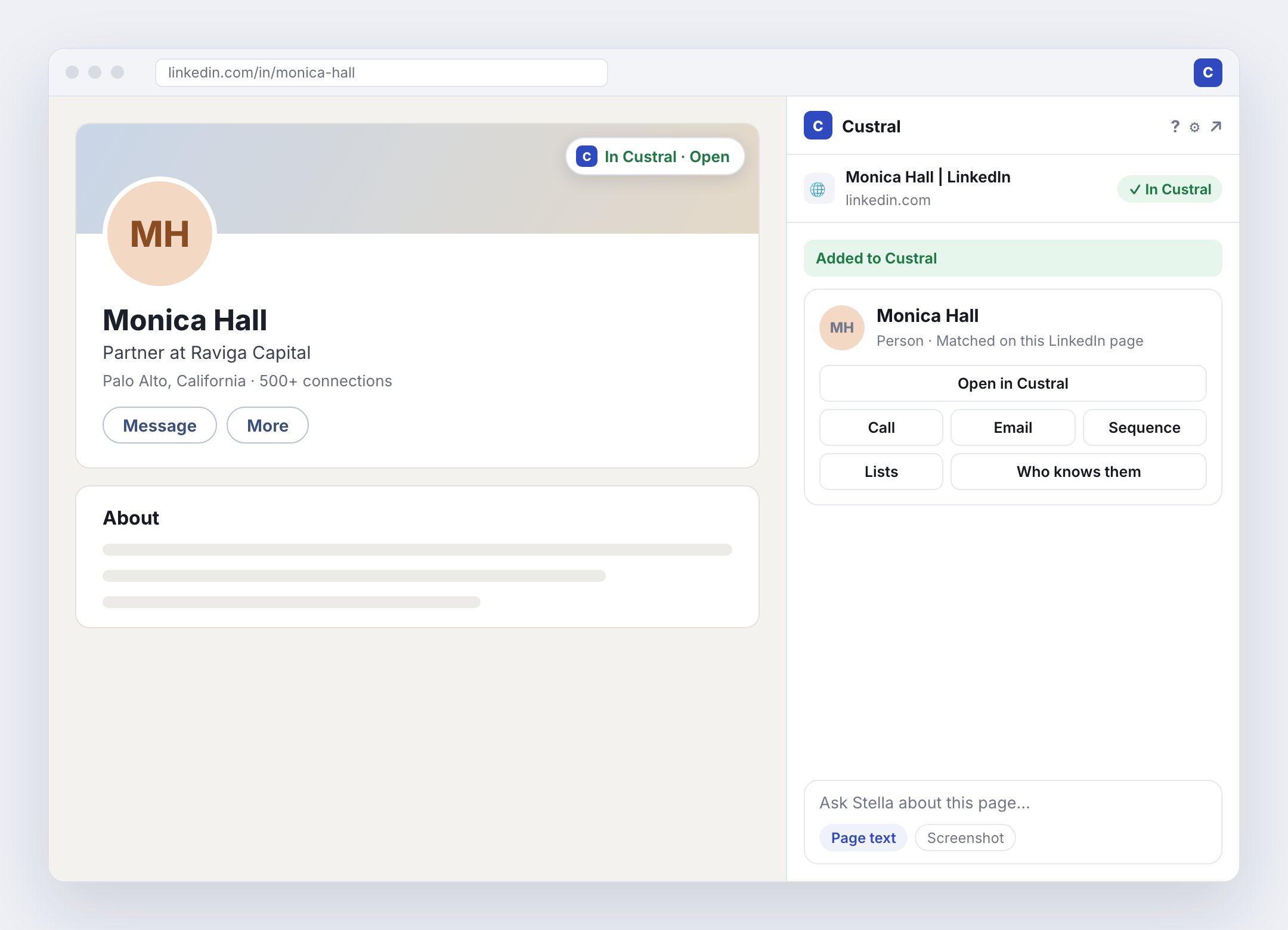
Custral is in the Chrome Web Store. Open the side panel on any page to ask Stella about it, add people from LinkedIn with their email filled in from your own mail, and call, email, add to a sequence or save a note without leaving the tab. See Chrome extension.Website chat
Visitors get an Ask bar, answers drawn only from your website, and a Help tab that searches it. Page prompts show visitors a note on the pages you choose, with reply buttons that start a chat. Customers your site has verified are greeted by name and can reach or book their account manager. Chats the AI finishes on its own stay out of the inbox, and Insights lists the questions it couldn’t answer so you can add the answer. See Website chat.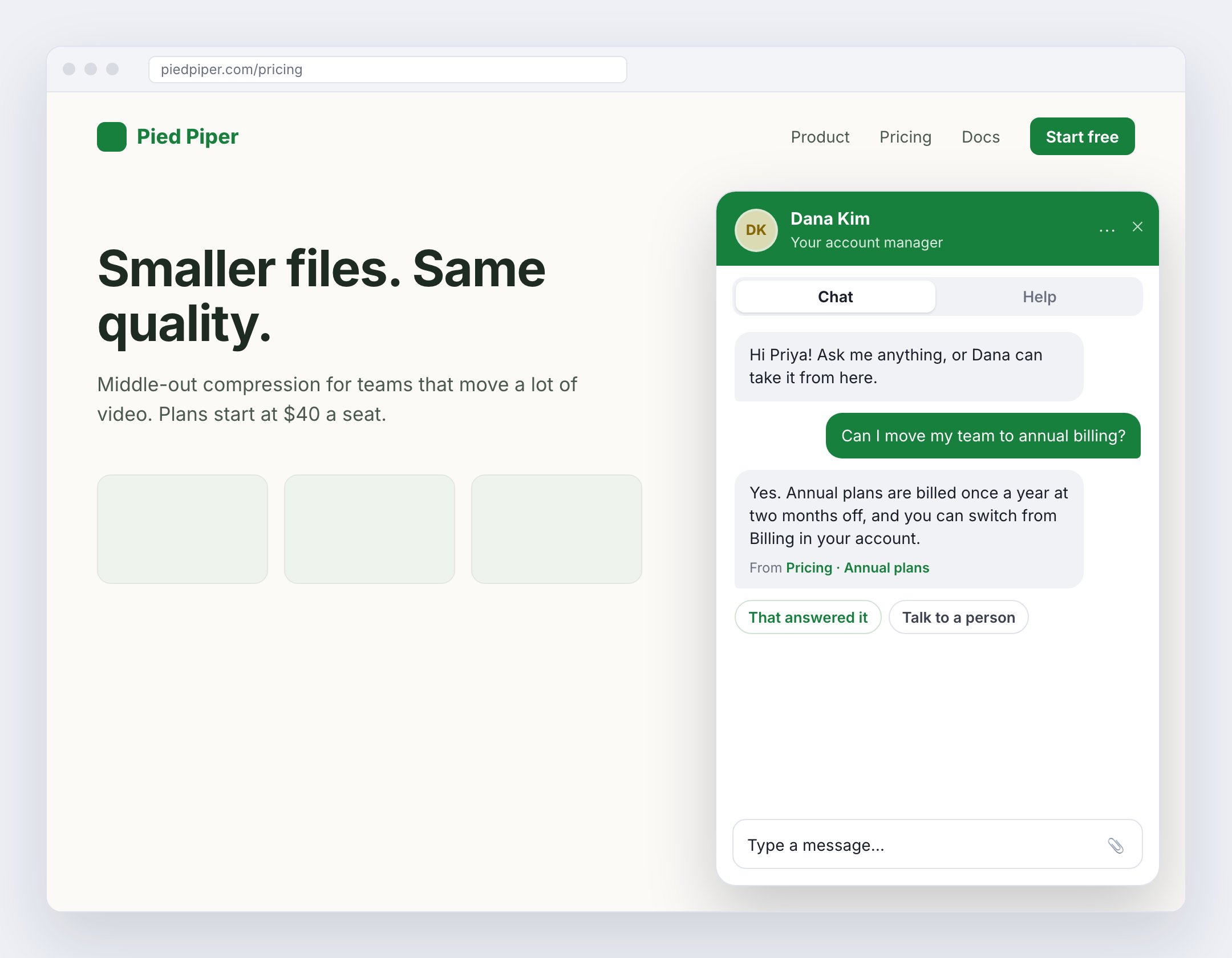
Revenue
Build a quote from your products and send it. Your customer accepts on one page, signs when you attach a contract, and adds a card or chooses invoices, and you countersign. Billing runs on your own Stripe account, and Metrics shows MRR, ARR, net retention and churn. See Revenue.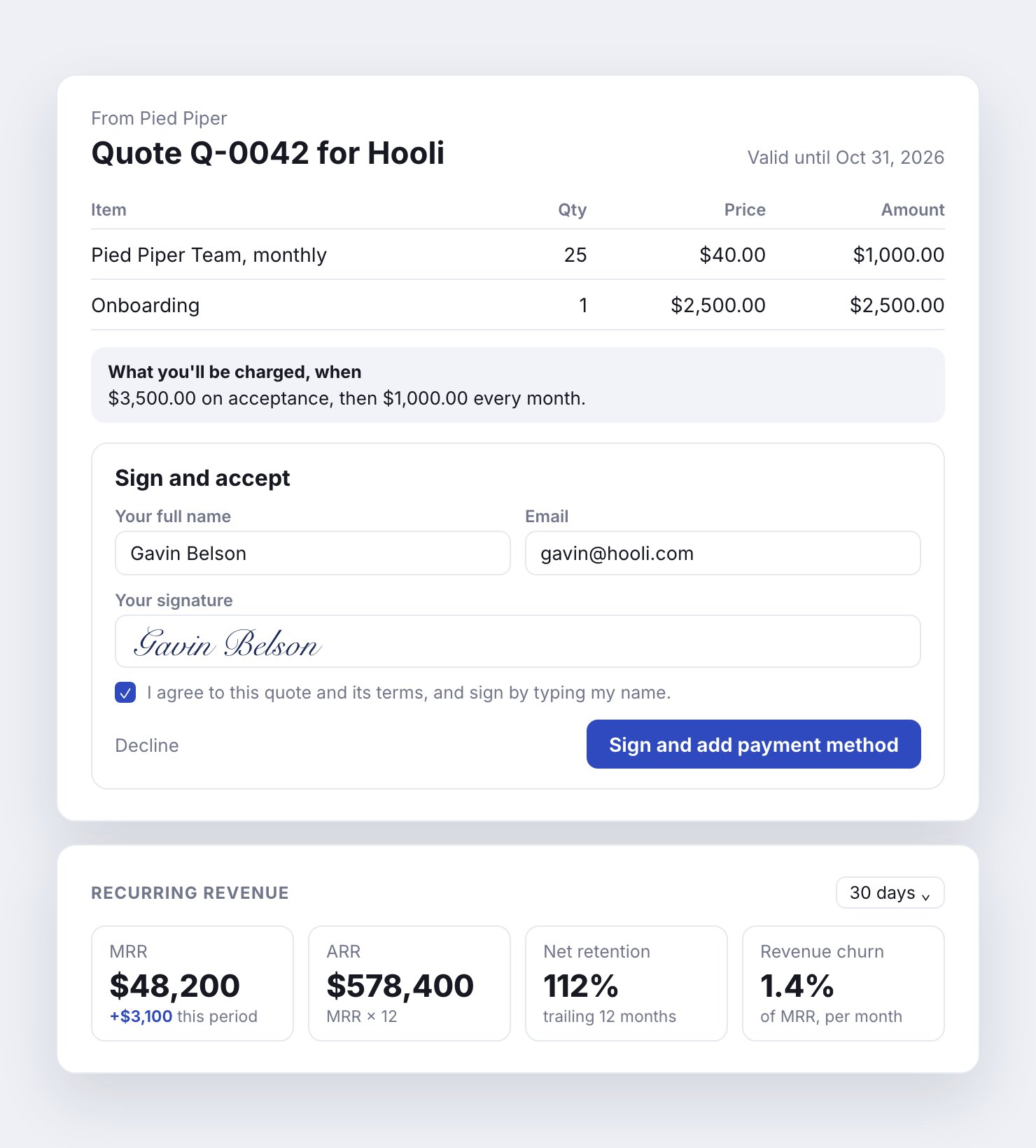
Coaching goals and Call Library
Set a goal like three reviews per rep each week, and Custral picks a mix of calls and makes a review task for each. Keep the calls worth learning from, or a clip of one, in the Call Library and assign them as listening. Managers can score a review from their phone. See Coaching goals.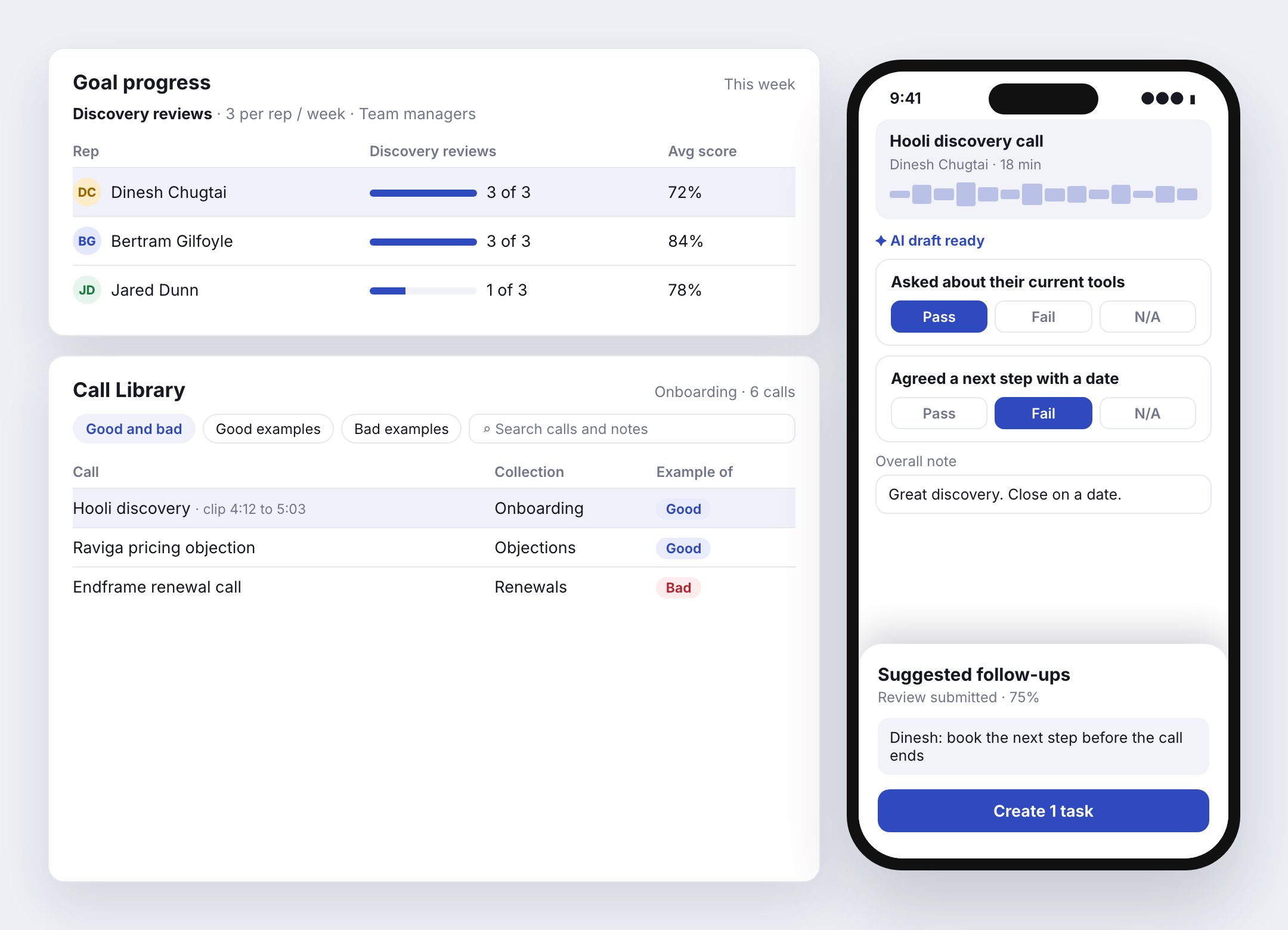
Also new
- Email rules: label new mail, mark it read or done, or move it to spam or trash. Make a rule from a sender, an email or a suggestion, and undo any run. On mobile too.
- Import with Stella: bring your data in with Stella’s help, now including Attio. See Data migration.
- Workspace preview: see changes to your workspace before they go live, then apply them.
- Chat widgets: run more than one per workspace, each with its own suggested questions and page prompts.
- Desktop: tabs show what they hold, Ctrl+Tab and Cmd+1-9 switch tabs, Check for Updates sits in the app menu, and the menu bar shows time left in a meeting. See Desktop.
- Stella: Send now on a queued message, Stop ends a reply right away, and Stella checks the product docs when you ask how something works.
Fixed
- Single sign-on works on the web.
- Mail that lands in Trash is filed without a push, an auto-reply or a workflow.
- Conversations keep updating live after a reconnect.
- Stella’s email drafts keep their paragraphs and reply in the right thread.
- Phone calls play their recording.
- PDF attachments preview in the email reader.
Focus Mode sorts your inbox, records open in a peek, and a rebuilt mobile app
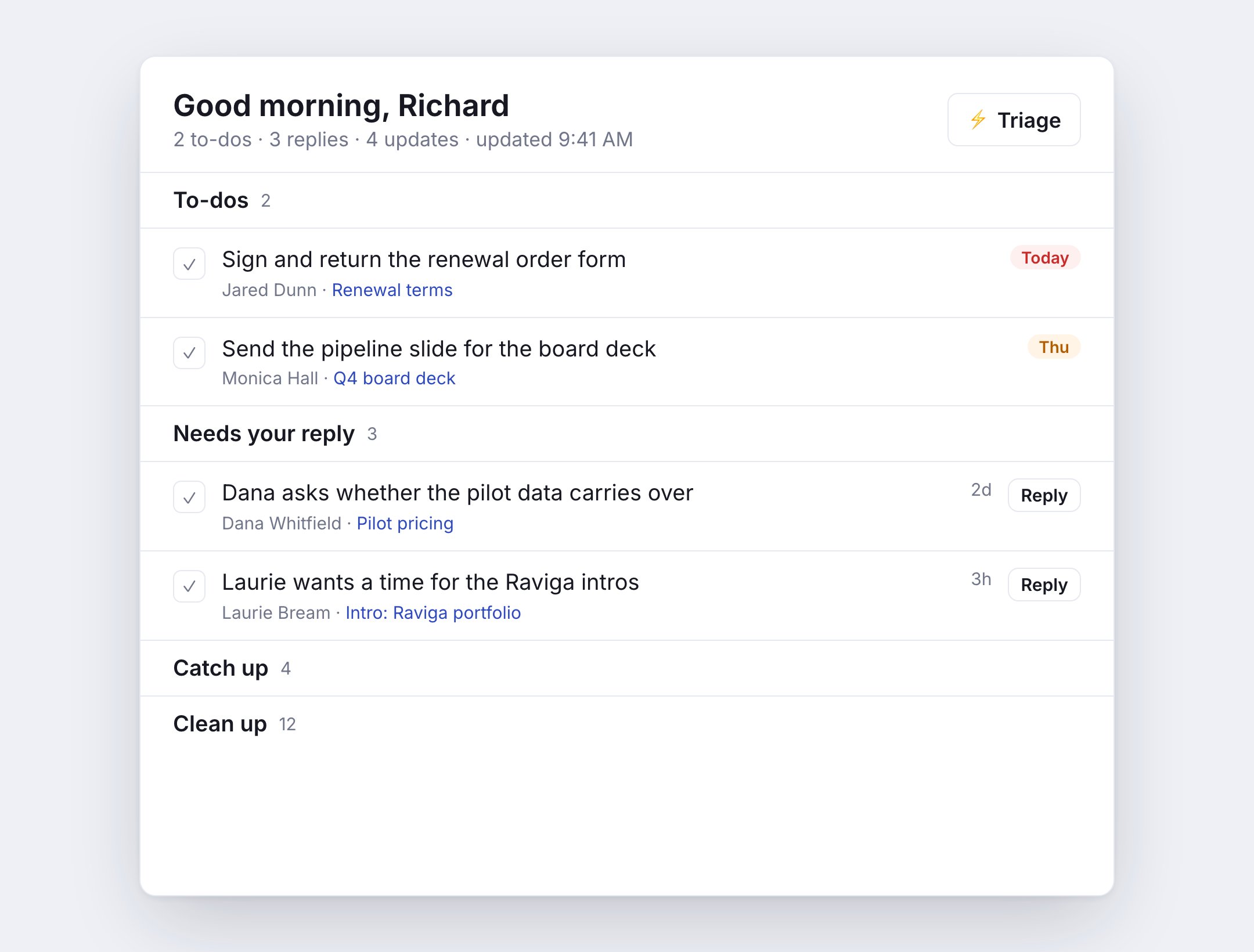
Focus Mode and Triage
A Focus tab in email sorts every mailbox into To-dos, Needs your reply, Catch up and Clean up. Press Triage to clear junk, file mail by your own habits, then work through the rest one email at a time. See Email.Peek
Click a record or page and it opens in a side peek over the screen you’re on, so you never lose your place. Step to the next record from the top bar, drag the edge to resize, or switch to a center peek or full page, and set which one a view opens by default. See Peek.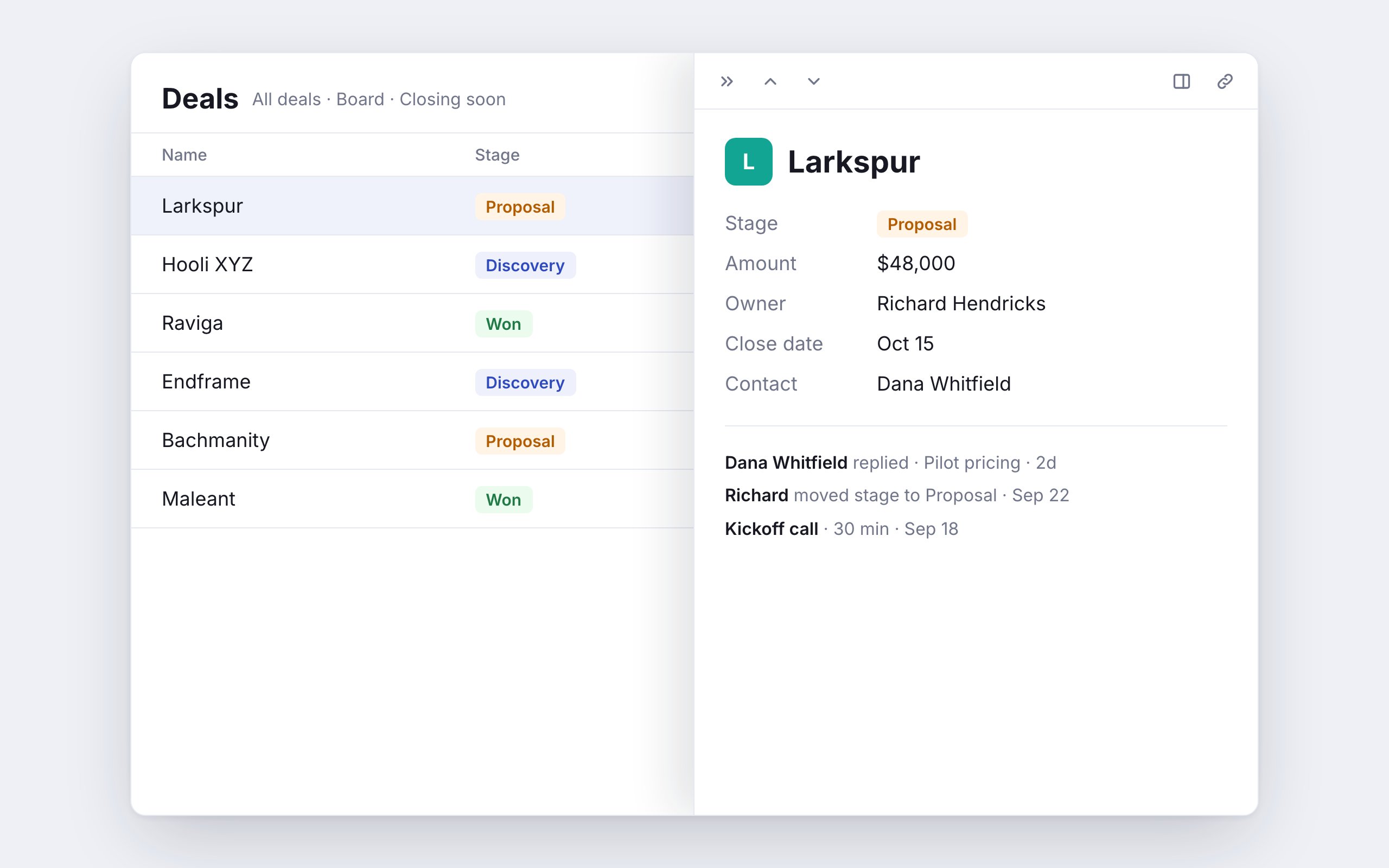
A rebuilt mobile app
A new tab bar for Mail, Convos, Home, Calendar and Library, with Search, Ask Stella and + in one row on every tab. Email attachments preview as cards, and Android home-screen widgets follow dark mode. See Mobile app.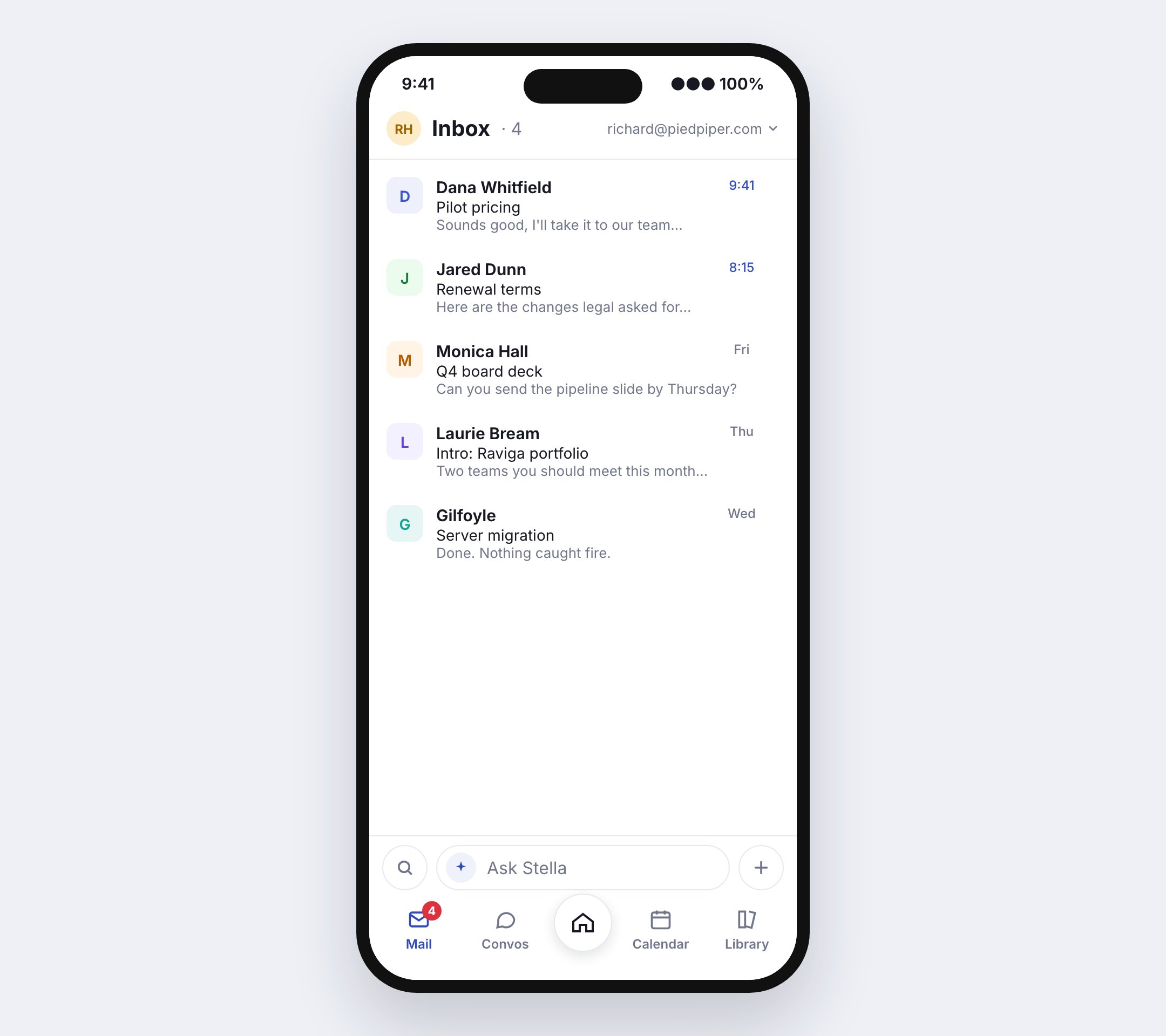
Daily brief
Turn on a morning brief and an end-of-day recap on Home, push or email: your meetings with a prep note, replies you owe, who you’re waiting on, records you own, and overdue tasks, each with a one-tap action. Ask Stella about it from the brief. Set it up in Settings → Daily Briefs. See Daily brief.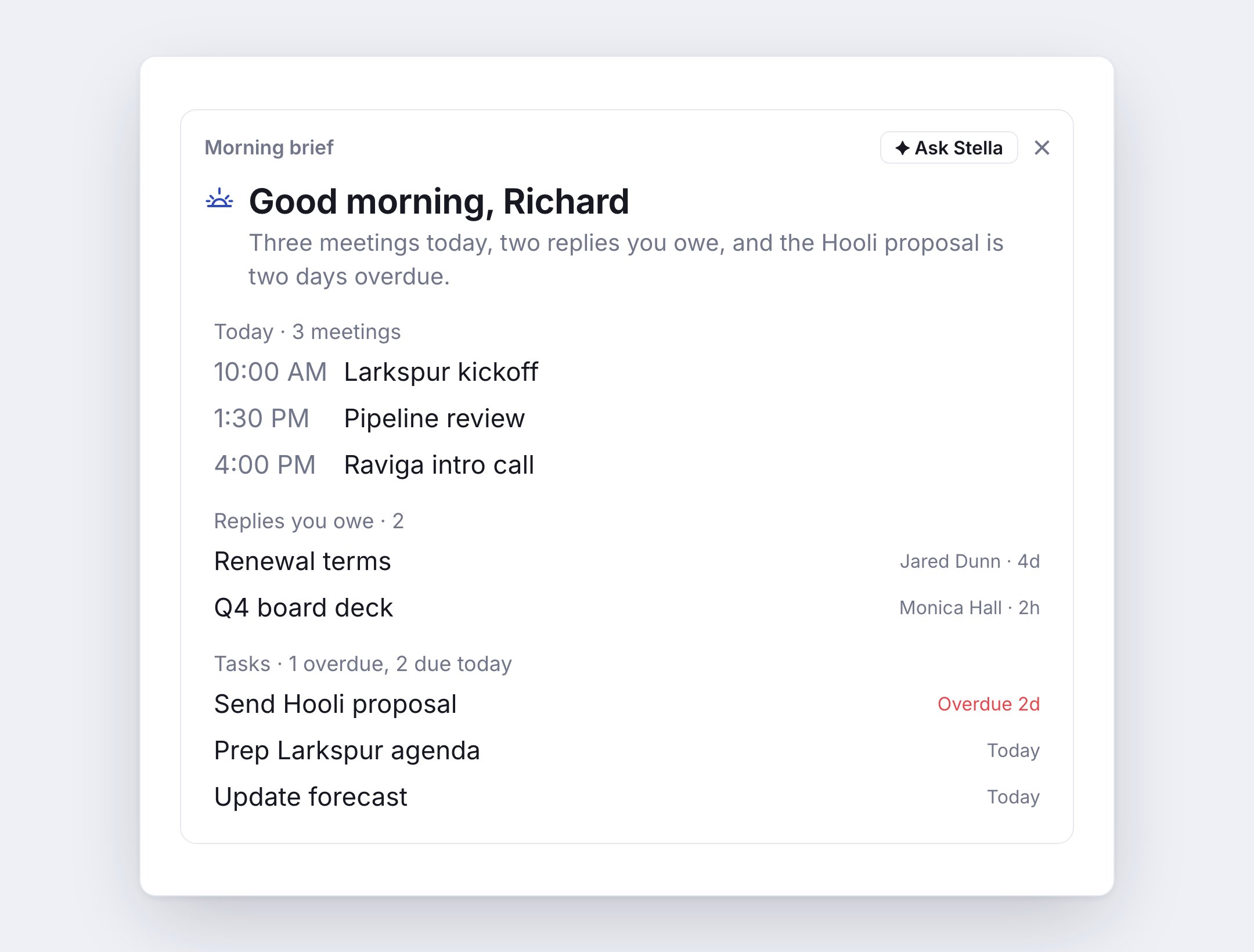
Also new
- Follow-up nudges: a thread that has gone quiet for three days shows a nudge on its inbox row, and Remind me if no reply brings a sent email back if nobody answers. See Reminders.
- Character avatars: build an avatar in Settings → Avatar and pick a signature animation. It shows on web, mobile and in emails.
- Development property: every record lists the commits and pull requests that name it, as a table column or in the property list. See GitHub.
- Workflows: the email step has a formatted body editor, an Add my signature switch, and a live preview. See Actions.
- Email: an Archive after reply setting, Google contacts in the recipient picker, and emails Stella finds open with a click.
- Calendar: create a calendar from the sidebar, and drag across the swatches to show or hide several at once.
- Stella: shares real booking links for each meeting type, and asks shorter questions.
Fixed
- Closing a conversation finishes right away.
- Labels and read state you change in Gmail show up in Custral right away.
- Report charts fit large totals on the value axis.
- Newly connected calendars appear without a reload.
- Stella shows times in your time zone.
- A record’s associations all show at once, each with its full name.
GitHub commits link straight to your records
- GitHub: commits sync alongside pull requests and link to a record when their message names it. See GitHub.
- Email: reopening a draft keeps its attachments, a thread the provider already removed shows as done instead of erroring, and a message that just arrived stays put on the inbox list.
- Onboarding: start a new workspace from your own data by importing a file, connecting HubSpot, or asking Stella to design it. See Data migration.
- Web: press Enter to exit a list while writing, drop a file onto an email to attach it, and undo works right after you send.
Sign in with your company’s identity provider, and text Stella
- Single sign-on: connect your workspace to your identity provider so your team signs in with the accounts they already have. See Users.
- Text Stella: message Stella from a verified phone number and get answers and updates over SMS. See SMS.
- Schema designer: Stella shows a diff of everything it will change before it builds, and each object now has one editor for its fields, list views and templates. See Schema preview.
- Email: Stella suggests a reply on any thread, auto-reply templates answer with a trustworthy first name, and a read-activity feed shows opens, clicks, replies and bounces. See AI assist.
- Calendar: see out-of-office, focus and working-location events, whether a meeting is being recorded, and choose which calendar when you have more than one. See Calendar.
- Desktop: an agenda popover in the menu bar, a quick-search window that runs commands and asks Stella, and a What’s new panel for this feed. See Desktop.
Campaigns to a list, and Stella shows you before it builds
- Campaigns: send an email to everyone on a list, personalized with merge fields, with permissions on who can send.
- Stella now previews an automation before building it, including branches and relative due dates, and can plan a whole page of tabs for you to review first. See Dashboard preview.
- Conversations get an Account tab with the customer’s key details, drafted replies from Stella while a customer waits, linked records, and sharing by link or email. See Conversations.
- Rollups, formulas and relations refresh live across tables, boards and the record page. A new Grade block shows a full score breakdown. See Grade.
- Coaching: a scorecard is prefilled after a call, and new workspaces start with four scorecards. See Scorecards.
- A buttons block for dashboards.
- The chat widget has a customizable look and a redesigned conversation view.
- On desktop, sign-ins and checkout open in your default browser.
Nineteen webhook events, and Slack answers wherever it’s invited
- Outbound webhooks grew from 5 events to 19, with retries over 24 hours. See Webhook events.
- Stat cards on dashboards can say what their number means.
- Slack: @Custral answers wherever the bot is invited, and reacts with 👀 when it picks up a question. See Slack.
- Share dialogs show how many times a short link has been clicked.
- Setup tasks close on their own once the workspace has done them.
See your usage against your plan, and insert anything from the composer
- Plan usage: see how much of each plan limit your workspace has used. See Billing & Credits.
- Email: a thread’s draft shows in the inbox, and the composer palette inserts meetings, forms and files. See Compose.
- The channels list has search and stats, and each channel gets an Overview tab.
- Stella previews a deck before it creates it.
- The Calendar module card shows your upcoming meetings.
- Retention policies give notice before they delete anything.
- On-call: shifts can be scheduled ahead, and away means away. See On-call.
One routing model, on-call shifts, and forms that report back
- Routing now runs on one model of teams, rotations and groups, with per-person capacity. See Inbox routing.
- On-call: teams can hold a shift. See On-call.
- Forms: one question builder, a Form Submitted workflow trigger, and views, completions and per-page drop-off. Forms also work inside the chat widget. See Forms.
- The chat widget can accept a visitor’s identity from your server. See Widget identity.
- Calendar: dragging an invite asks before it reschedules everyone, and an event can say whether it blocks time.
- Caller ID verification shows its progress, and a missed code can be sent again. See Caller ID.
Move a call between devices, and home-screen widgets
- Calls: move a live call between your devices, and choose which device places it.
- Home-screen widgets on iOS and Android, including one that opens Stella ready to type. See Mobile app.
- Search across every object on mobile, with fuzzy and semantic matching.
- Two-step verification has recovery codes, and admins can reset it for a teammate.
- Mail: search filters you can see, ⌘-arrow range select, and ⌘U for the unsubscribe menu.
- The MCP server signs in through your browser. No key to paste. See MCP.
- Hosts can manage appointments and booking pages. See Scheduling.
Delete your account, and better-described schema
- Account deletion: remove your account from Settings on web or mobile. If you can’t sign in, request deletion from custral.com/request-deletion and confirm by email. See Your account.
- New objects and properties are now created with a description and an icon, so a workspace you build with Stella doesn’t arrive pre-flagged by the setup audit.
- Recommendations can be triaged in bulk.
The mobile app, rebuilt
The iOS and Android apps have been rebuilt on the Custral design system: one consistent chrome, list, and sheet vocabulary across every screen.- Full chat with Stella on mobile, including tool approvals and streaming replies.
- Redesigned dialer with a branded keypad and live number formatting.
- Incoming calls now surface full-screen on Android 14+.
- Pages, views, and records read a view’s real filters, sort, and columns: with board, grid, calendar, and timeline layouts.
Notion-style automations on any table
- Add an automation directly to a database table. Pick a trigger and an action without leaving the view.
- The sequence and workflow editor has been redesigned around plain language, so a step reads as a sentence instead of a form.
- Rename automations inline.
- Email: an inline unsubscribe menu and domain-level sender blocking. See Blocked senders.
Long text, auto-numbering, and virtualized tables
- The new Long Text property type holds paragraph-length values inline, readable by AI auto-fill, unlike a Notes document.
- ID properties can auto-number sequentially, with a configurable prefix and length, and backfill existing records.
- The records table is virtualized with infinite scroll, so large objects stay responsive.
Lists, Activities, and Focus mode
- Lists: membership tables, smart lists, and rolling cohorts, with a per-object tab and record facet.
- A system-seeded Activities object, so logged calls, emails, and notes land on the record timeline.
- Focus mode for tasks, with a Next-up list. See Tasks.
- The AI Modules catalog of installable kits.
One chokepoint for AI usage
Every AI feature now meters through a single credit path, so your balance updates live and spend breaks down by feature rather than landing in one bucket. Non-AI categories drill into individual line items. See Billing & Credits.Guided onboarding, and previews before Stella builds
- A new onboarding flow: choosable guided paths, an interactive interface tour, and a go-live wizard.
- Stella now shows you a dashboard or view before it builds it. See Dashboard preview.
- Workflows and Sequences are top-level modules.
- AI-generated titles for chat conversations, and a ⌘N new-chat hotkey.
The developer platform opens up
@custral/sdk: the official server-side TypeScript SDK.- API key authentication and a webhooks foundation.
- Deterministic AI recommendations with global object mappings.
- Sounds for incoming calls and new conversations, with presets and custom uploads.
Reports you can click into
- Drill-down on every chart. Click a segment to open the records behind it.
- Interactive legend keys, dashboard date-filter chips with an always-visible calendar, and a live chart preview while you configure a block.
- Stella can build and configure charts end-to-end.
A local mailbox mirror
Email lists now read from a local mirror of your mailbox rather than fetching from the provider on every load, with background backfill and reconciliation. Threads open noticeably faster, and the inbox stays responsive on large mailboxes.Email push, with actions
- Email push notifications carry a body preview, not just a subject.
- Reply and Mark done directly from the notification.
- Notifications group by inbox, with a group summary.
Two-way voice chat with Stella on mobile
Live microphone streaming and audio playback, so you can hold a spoken conversation with Stella from your phone. Google sign-in now auto-links to an existing account with the same verified email.Notification dispatch and coaching
A single cross-surface notification system with socket and push delivery, plus the coaching routes behind scorecards and trends. The workspace setup audit gained AI-generated remediation suggestions.AI settings + object default templates
- New AI settings page with a model picker and system prompt. Pick the workspace default model and customize the instructions that prefix every chat.
- Object default templates for faster setup.
- A refreshed landing screen.
AI Agents
Two related capabilities ship together:- Chat Agents: reusable AI personas with custom instructions, scoped objects and pages, and controllable tool access. See Chat Agents.
- Property Auto-Fill Agents: AI that fills a property on demand or on triggers. See Property Auto-Fill.
- Plus model selection, private pages, and a refreshed AI conversation experience.
Email list polish
Hover-as-active selection, perf improvements, larger checkbox hit target.Short links, favorites, private pages
Short links, favorites, private pages, and the ability to associate files with a record. With faster load times across the board.Conversation history + audio devices
Backfilled conversation history, audio input/output device selection for calls, and better handling of guest participants in call actions.Forms & scheduling
New forms and scheduling features, including booking management and email templates.Aggregations
New calculation menu with expanded aggregation methods: count variants, percentiles, median, range.Guest sharing + Timer property
Guest sharing with email verification, view filters, and the new Timer property type.Real-time AI voice + HubSpot bi-directional sync
- Real-time AI voice chat with call-recording transcription.
- HubSpot bi-directional sync. See HubSpot integration.
- Disposition assignments, playbooks, and conversation stages.